

Download Stock Firmware/ Flash File for Iqoo 11 PD2243F:
official Stock Firmware Now available for Iqoo 11 PD2243F and You can download it from below. by using this firmware you can solve all software Issues with in your Iqoo 11 PD2243F such as hang on Logo, Factory Data Reset lock, fastboot Mode, display blank or white after flash, dead recovery, dead after flash etc.
Note:
- make a backup before Process
- it will erase all your data Including Internal storage
- downgrade work only with flash tools, recovery method not suitable for downgrade..
Must Require:
Firmware Information: |
|
|---|---|
| Device Name | Iqoo 11 PD2243F |
| ROM Type | Full ROM |
| SoC | Qualcomm 8 Gen2 |
| OS | Android 13 |
| Password | Null |
| Root Access | No |
| Region | Check below List |
| Firmware Version | Check below List |
Downloads Links:
Available Firmware~
- PD2243F_EX_A_13.0.8.6.W30.V000L1_vivo_qcom: Download
- PD2243F_EX_A_13.0.8.4.W30.V000L1_LA.VENDOR.13.2.0.r1-03600-KAILUA-SM8550_Split_QPST: Download
Flash Tools:
- QFIL: Download
usb Driver:
- QD Loader Driver: Download
How to Flash Iqoo 11 PD2243F Via QFIL:
- Download & Extract QFIL tools
- Download & Extract Firmware Package
- Install QD Loader usb Driver on your PC
- Run QFIL set device memory type in settings
- connect Phone in EDL Mod
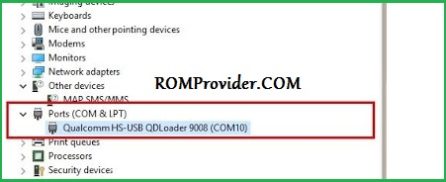
- You can see usb driver Like below Image in device Manager (if not then your Phone Not detected by your computer, you have to do test Point= Short the test Point Pinout or try fastboot to edl method(available in ROM2box)
- on QFIL Load Programmer and XML Files from ROM folder
- Click ‘Download’
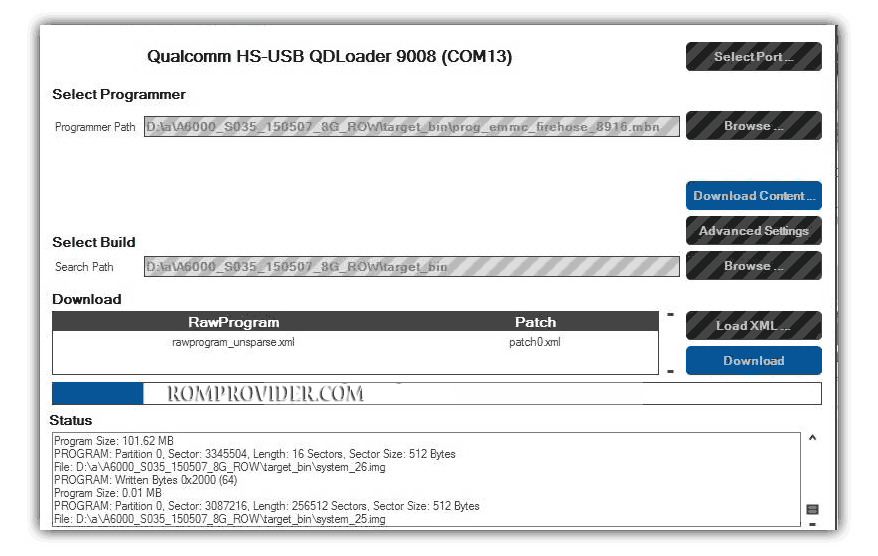
- Wait until success.
- once done disconnect & switch it ON..
How to Install recovery ROM:
- put downloaded file to root directory
- reboot phone
- check notification panel for update notification
- click update notification and follow on screen Instructions
Flashing Recovery ROM via Fastboot:
- extract update rom (payload.bin) using payload dumper
- use fastboot flash in this format or run update-image.cmd
fastboot flash 'partition name' 'filename'
Read also:
- QCOM Dual Device Network ID (Baseband) Writer (Repair Device Network ID (Baseband) Number)