

Realme X50 Pro RMX2075 Flash File Free Download:
Official Stock Firmware Now available for the Realme X50 Pro RMX2075 & You can download it from below. by using this firmware you can solve all software Issues with in your Realme X50 Pro RMX2075 such as hang on Logo, Factory Data Reset lock, fastboot Mode, display blank or white after flash, dead recovery, dead after flash etc.
Pre-Requirement’s
- first make a complete backup of your Personal data (if possible)
- charge the device at least 50% to prevent accidental shut down during the process
Must Require:
Disclaimer:
- flashing May brick your Phone, flash at own risk
Firmware Information: |
|
|---|---|
| Device Name: | Realme X50 Pro RMX2075 |
| ROM Type: | Full ROM |
| SoC: | QCOM |
| OS: | Android 11XX |
| Password: | Null |
| Root Access: | No |
| Region: | Check Below List |
| Firmware Version: | Check Below List |
Downloads Links:
OFP Packages:
Flash tools:
- MSM Download tool: Mirror
- Contact me for MSM tool Login, unbrick, Factory Data Reset, Reset, Region Change & root >>
usb Driver:
- QCOM 9008 EDL driver: Download
How to Install Stock Firmware on Realme X50 Pro RMX2075:
SLA Enable device, you have to use official MSM download tool with a authorized oppo account.. or fastboot with unlocked bootloader
- Extract ROM File & tool in same folder
- Install QCOM 9008 usb driver on your computer
- connect Phone to computer followed by this Pattern > volume up + volume down + USB cable, if no device then you have to do test point..
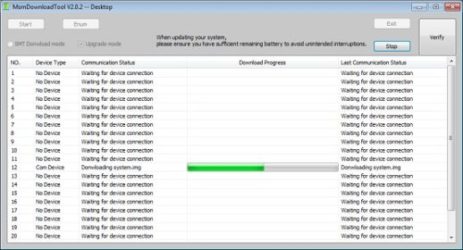
- run MSM Download tool
- Login with Oppo ID
- locate firmware ofp file
- Click start .
- wait until success,
- once done. unplug device and switch it ON.
have any question Let Me know via comment.
How to Install recovery ROM:
you can sideload Via stock recovery or use Oneplus local updater
-
adb sideload 'filename'
Flashing Recovery ROM via Fastboot:
- extract update rom (payload.bin) using payload dumper
- use fastboot flash in this format
fastboot flash 'partition name' 'filename'