
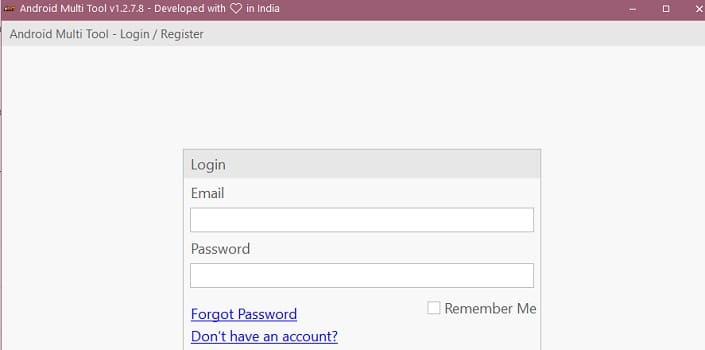
Android Multi Tool (AMT) is a premium, professional-grade smartphone servicing application developed by the AMT Team. Engineered specifically for retail service centers and mobile technicians, this powerhouse application is highly popular for its ability to handle secure boot restrictions without requiring expensive physical hardware dongles.
The tool stands out in the GSM community for providing built-in DAA (Device Authentication Authorization) and SLA (Serial Link Authentication) bypass protocols for highly restricted Tecno, Infinix, and itel smartphones. Beyond these, AMT supports an extensive database of MediaTek (MTK), Qualcomm (QCOM), and Spreadtrum/Unisoc (SPD) devices from massive global brands like Realme, Motorola, Xiaomi, Vivo, and Samsung.
📥 Direct Download & Infrastructure Section
Always download the clean, official setup build directly through the verified infrastructure channel below:
| Software Application Name | System Platform Support | Official Download Link |
| Android Multi Tool (AMT Setup) | Windows 7, 8, 10, 11 (32/64-Bit) | 📂 Download AMT Tool Official Setup |
-
Execution Style: Visual Desktop Application Installer
-
License Profile: Premium Account-Based (Requires Login ID / Credits)
-
Core Prerequisite: A stable internet connection is required to authenticate with the AMT online servers during operations.
🔑 Need Activation Credits or a Login ID? Android Multi Tool is a server-authenticated service. To create a new user account, purchase active usage plans, or top up your server credits to run premium authorizations (like advanced SLA Keys), you can Contact Me Directly Here for instant remote dealer assistance.
Key Features of Android Multi Tool (AMT)
-
Official MediaTek Auth Bypass: Instantly bypass Secure Boot restrictions (DAA/SLA 1.0, 3.0, and 5.0 keys) on Infinix, Tecno, and itel devices to allow unrestricted firmware flashing.
-
One-Click Screen Lock Reset: Remove forgotten structural user locks—including fingerprint data, pattern lines, numeric PINs, and privacy passwords—safely.
-
Universal FRP Account Wiping: Reset Factory Reset Protection (FRP) and bypass stubborn Google account verification locks across thousands of Android models.
-
Cloud Account Removal: Effortlessly bypass Xiaomi Mi Account locks, persist partition errors, and Samsung Knox configurations.
-
Low-Level Hardware Flashing: Reinstall official factory stock firmware images onto dead or bootlooping Qualcomm, MTK, and Unisoc smartphones.
-
Fastboot to EDL Transformation: Boot unresponsive devices directly into low-level Emergency Download (EDL 9008) mode via software commands without forcing hardware test points.
How to Install Android Multi Tool
Because AMT relies on secure server syncing, ensure your security permissions are set correctly during setup:
-
Download the latest official installer package from the direct download button pinned above.
-
Right-click the installation executable file and select Run as Administrator.
-
Follow the basic steps of the setup wizard to complete the installation on your computer.
-
Launch the application via the Android Multi Tool shortcut icon generated on your desktop.
Step-by-Step Operations Guide
Step 1: Authentication and Dashboard Entry
-
Launch the AMT interface on your desktop.
-
Input your registered Username and Password credentials into the prompt fields, and click Login.
-
Verify your available server token balance on the main profile dashboard before initiating security-heavy actions.
Step 2: Selecting Model and Function
-
Navigate through the top tab layer to specify your phone’s internal chipset architecture (e.g., MediaTek, Qualcomm, or Unisoc) or select the specific brand tab (e.g., Tecno/Infinix).
-
Choose your target service script function from the operational menu workspace (such as Reset FRP, Format Userdata, or Write Flash).
-
Click the execution Start button to put the tool on connection standby.
Step 3: Hardware Hookup and Execution
-
Power off your smartphone completely.
-
Press and hold down both the Volume Up + Volume Down hardware buttons simultaneously.
-
While holding the keys, connect the device to your PC using a high-quality USB data cable.
-
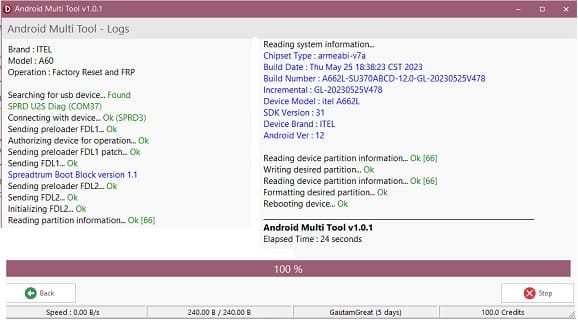
The AMT online server will automatically intercept the port connection, push the signature auth loader payload, and finish the repair script in under 10 seconds! Once the progress log confirms a success message, unplug your phone and turn it back on.
Related Free Repair Companions
Looking to expand your digital workshop with alternative free premium utilities? Check out this highly recommended setup: