

OnePlus 9 Pro 5G LE2127 Flash File Free Download:
official Stock Firmware Now available for the OnePlus 9 Pro 5G LE2127 & You can download it from below. by using this firmware you can solve all software Issues with in your OnePlus 9 Pro 5G LE2127 such as hang on Logo, Factory Data Reset lock, fastboot Mode, display blank or white after flash, dead recovery, dead after flash etc.
Pre-Requirement’s
- first make a complete backup of your Personal data (if possible)
- charge the device at least 50% to prevent accidental shut down during the process
Must Require:
Disclaimer:
- flashing May brick your Phone, flash at own risk
Firmware Information: |
|
|---|---|
| Device Name: | OnePlus 9 Pro 5G LE2127 |
| ROM Type: | Full ROM |
| SoC: | QCOM SD888 |
| OS: | Android 12 |
| Password: | Null |
| Root Access: | No |
| Region: | China |
| Firmware Version: | Check Below List |
Downloads Links:
OFP Packages:
Flash tools:
- MSM Download tool: Mirror
- contact me for MSM tool Login Password, Region Change, Factory Data Reset, Repair >>
usb Driver:
- QCOM 9008 EDL driver: Download
How to Install Stock Firmware on OnePlus 9 Pro 5G LE2127:
SLA Enable device, you have to use official MSM download tool with a authorized oppo account..
- Extract ROM File & tool in same folder
- Install QCOM 9008 usb driver on your computer
- connect Phone to computer followed by this Pattern > volume up + volume down + USB cable, if no device then you have to do test point..
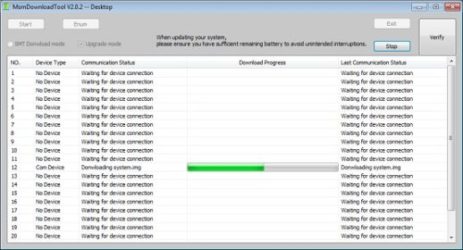
- run MSM Download tool
- Login with Oppo ID
- locate firmware ofp file
- Click start .
- wait until success,
- once done. unplug device and switch it ON.
have any question Let Me know via comment.