

Download Stock Firmware/ Flash File for Realme Pad X RMP2108:
official Stock Firmware/ Flash File Now available for Realme Pad X RMP2108 and You can download it from below. by using this firmware you can solve all software Issues with in your Realme Pad X RMP2108 such as hang on Logo, Factory Data Reset lock, fastboot Mode, display blank or white after flash, dead recovery, dead after flash etc.
Realme Pad X RMP2108 Run on Android 12 & it is Powered by QCOM SD695 Processor. connectivity Option’s Include 4G 5G GPS, Wi Fi, bluetooth etc. the device come with 4GB of RAM and 64GB storage that can be expandable via SD card.
Note:
- make a backup before Process
- it will erase all your data Including Internal Storage
Firmware Information: |
|
|---|---|
| Device Name: | Realme Pad X RMP2108 |
| ROM Type: | Full ROM |
| SoC: | QCOM SD695 |
| OS: | Android 12 |
| Password: | Null |
| Root Access: | No |
| Region: | check below list |
| Firmware Version: | RMP2108_11_A.14_20220826 |
Downloads Links:
Available Firmware:
- RMP2108export_11_A.14_2022082614450137 (EDL) IN, MY, PH: Download
China:
- RMP2108domestic_11_A.07_2022070702301443: Download
- RMP2108domestic_11_A.04_2022060100080924: Download
Flash Tools:
usb Driver:
- qcom usb driver: Download
How to Flash Realme Pad X RMP2108 Via EDL:
SLA Enabled device, you have to use official MSM download tool with a authorized oppo account or try ROM2box..
- Extract ROM File & tool in same folder
- Install QCOM 9008 usb driver on computer
- connect Phone to computer by using USB cable (in EDL Mod)
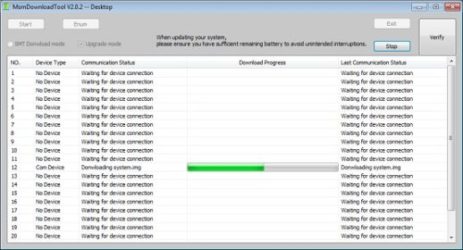
- Run MSM Download tool.
- from the Login prompt login with id
- locate ofp firmware click ‘START‘ button, wait until success, done
Read also:
- QCOM Dual Device Network ID (Baseband) Writer (Repair Device Network ID (Baseband) Number)