

Rooting is the way to obtain Supersu Right’s on a Android device, that means after Rooting the Phone you have (sudo) full Right to perform any system task.
Doogee V11 smartphone Run on Android 11 and it is Powered by Mediatek MT6833 Processor. it is a dual SIM smartphone support Nano SIM cards, connectivity Option’s Include GPS, WIFI, hotspot, bluetooth etc. the device come with 8GB of RAM and 128GB of storage that can be expandable via SD card.
Requirement:
- unlock bootloader by following this guide
- ROM2box and Required USB Driver: Download
Note:
- all userdata will be erased, must make a backup before process
- we strongly suggest below method (boot.img dump) because boot.img from a different firmware version may cause bootloop.
- The boot image is NOT the bootloader image. do not confuse between them flashing the wrong image to bootloader could brick your device.
How to Root Doogee V11:
- Install USBDK and Mediatek driver on Your computer
- Download & Extract ROM2box
- Run ROM2Box.exe
- Click Mediatek/Firmware Reader!
- mark “Full Firmware”
- click ‘START’ button
- Once the process Started, turn Phone OFF, Now together Press Volume up + down key & Insert USB, Once Phone detected Immediate Release key (make sure your phone stable in device manager)
- done, it will take 15Min
- Now Move boot.bin (rename it boot.img) from ROM2box/out folder to your phone
- on Phone Install Magisk Manager
- Now patch boot.img using Magisk and Move back it to computer
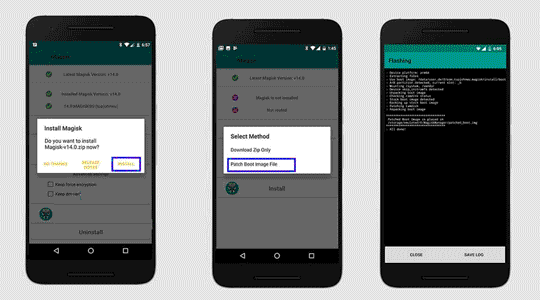
- Open ROM2Box.exe Go to Mediatek/Firmware Flasher/Flash Single Partition
- click Select file and locate “Magisk_Patched_boot.img”
- Now mark boot.img
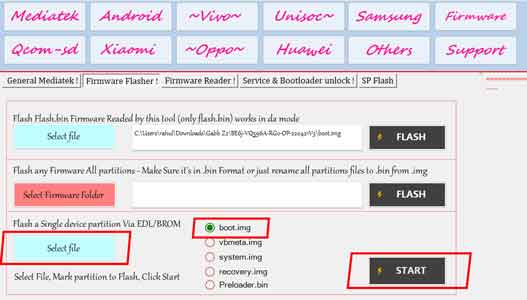
- Click ‘START‘ button
- Once the process Started, turn Phone OFF, Now together Press Volume up + down key & Insert USB, Once Phone detected Immediate Release key (make sure your phone stable in device manager)
- Follow the same and flash vbmeta.img.empty from ROM2box folder (in this time you have to click vbmeta.img)
- done.
Method 2 (using fastboot):
- you can write patched_boot.img using fastboot method too, open ROM2box go to android/fastboot tab from the partition flasher locate patched file mark boot.img connect your phone in fastboot mod and click ‘START’ button, done
Related: