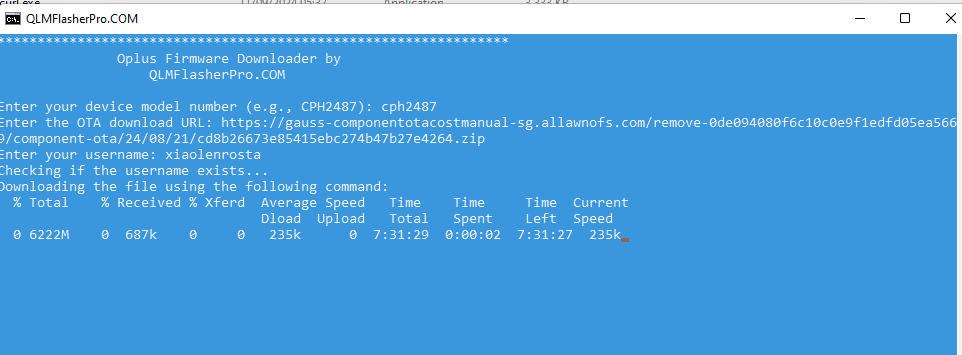
The Oplus Firmware Downloader is a highly efficient, lightweight command-line script utility engineered specifically for Windows. It serves as a dedicated server mirror fetcher for Oppo, Realme, and OnePlus smartphone users.
When attempting to grab official Over-The-Air (OTA) update packages or recovery flash files directly via generic web browsers, users frequently encounter a frustrating “Permission Denied” or Access Forbidden server error. The Oplus Firmware Downloader successfully bypasses these restrictive validation checks by pushing authorized endpoint headers directly to official OPlus delivery servers, allowing you to seamlessly pull high-speed, uncompressed stock packages down to your PC.
📥 Direct Download & Preparation Section
Get the clean portable execution tool directly from our verified host mirror below.
| Software Utility Name | Execution Environment | Direct Download Link |
| Oplus Firmware OnePlus | Web | 📂 Download Oplus Downloader Now |
| Oplus Firmware Oppo | Web | 📂 Download Oplus Downloader Now |
| Oplus Firmware Realme | Web | 📂 Download Oplus Downloader Now |
Technical Specifications:
-
Target Platforms: Oppo, OnePlus, and Realme OTA Links
-
File Structure: Portable 100% (No installation wizard required)
-
Supported OS: Windows 7, 8, 10, 11 (32-bit & 64-bit)
💡 Optimization Notice: Because this utility manipulates low-level local network protocols to authenticate server links and bypass download blocks, Windows Defender or your real-time antivirus software might trigger a false-positive warning. To avoid download corruption, ensure you Disable Windows Defender Protection temporarily during extraction and execution.
Note:
we integrate the tool directly in our server, it will give you direct download via browser, we don't host the firmware file on our server
Key Features of the Downloader
-
Bypasses Server Access Blockades: Instantly repairs the common “Permission Denied” download errors encountered with manual server links.
-
Universal OPlus Directory Hookup: Seamlessly processes recovery or incremental
.zippackages for Oppo, Realme, and OnePlus devices. -
Native High-Speed Transfers: Pulls directly from official content delivery network (CDN) channels without restricting or throttling your bandwidth speed.
-
Portable Script Wrapper: Lightweight setup that executes entirely within a secure command-line shell without bloating your system registry.
How to Use Oplus Firmware Downloader (Step-by-Step)
old version: Follow these clear execution steps to map your model identity and download your target ROM package:
Step 1: File Extraction
-
Download the tool package archive from our direct download block above.
-
Extract the file contents into a dedicated folder anywhere on your computer using WinRAR or 7-Zip.
Step 2: Initialize the Interactive Command Prompt
-
Open the extracted directory.
-
Locate the main executable file (
Oplus Downloader.exeor terminal batch script), right-click it, and select Run as Administrator. -
A terminal command window will open up on your monitor, requesting your input configuration variables.
Step 3: Populate Device Identity and Server Mapping
Input the exact parameters requested sequentially inside the console shell:
-
Enter Device Name: Type your phone’s official hardware model index string (Example: Type
cph2487for the OnePlus 11, or use your specific Oppo/Realme factory designation) and press Enter. -
Enter Download Link: Copy the direct raw official update OTA link string that previously threw an error in your web browser, paste it into the command prompt window, and hit Enter.
-
Enter Username: Type the specific authorized community developer tag string
xiaolenrostadirectly into the terminal interface and press Enter.
Step 4: Execution and Storage Verification
-
Monitor the Download: The utility will automatically authorize the handshakes, break the server permission lock, and display a real-time visual file download progress ticker banner.
-
Completion: Keep your terminal panel open and leave the internet connection undisturbed. Once the progress banner clocks 100%, close the application.
-
Locating Your ROM: Open your file explorer and look directly inside the primary directory of the tool folder; your freshly downloaded, uncorrupted stock
.zipor firmware file will be saved and waiting for you!