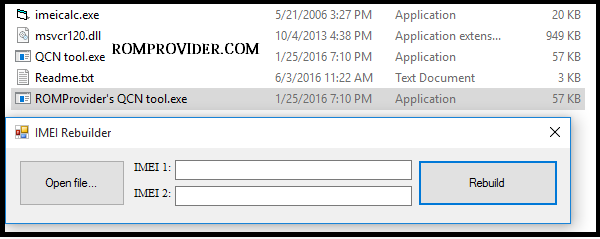
If you are dealing with network connection dropped bars, a “No Service” network signal block, or a corrupted baseband profile on your smartphone, QCN Rebuilder is an essential, lightweight utility for your PC setup. This specialized Windows program is designed to repair and restructure Qualcomm Calibration Network (QCN) files.
When flashing custom ROMs or performing deep system modifications on devices running Qualcomm Snapdragon processors, the sensitive EFS security partitions can sometimes become corrupted, resulting in an invalid or blank identity block. QCN Rebuilder allows you to load a working data backup configuration file, modify the internal data rows with your device’s original parameters, and rebuild a fresh, valid profile for flashing.
📥 Direct Download Section (Clean Setup Build)
Get the official portable utility from our secure, high-speed direct mirror link below.
| Software Utility Module Name | Release Profile | Direct Download Link |
| QCN Rebuilder (Universal) | Stable Windows Executable | 📂 Download QCN Rebuilder Latest Setup |
Technical Specifications & Requirements:
-
File Structure: 100% Portable execution utility (No installation wizard required).
-
Supported OS: Windows 7, 8, 10, 11 (32-bit & 64-bit).
-
Required Companion Software: Needs QPST Tool Suite installed on your desktop to read and recover the generated parameters.
-
Legal Compliance Rule: This tool is strictly intended for repair and restoration purposes. Users must only rewrite the original, unique identity numbers printed on the device’s physical box or rear factory sticker label.
Key Benefits of QCN Rebuilder
-
One-Click Flag Rewriting: Simplifies the tedious task of hexadecimal hex editing down to an automatic point-and-click textual swap input pane.
-
Dual SIM Architecture Mapping: Natively supports reconstructing variables for both Single-SIM configurations and Dual-SIM layouts (SIM 1 + SIM 2 fields).
-
Lightweight Implementation: Operates completely inside a clean graphical window with a footprint under 2MB, requiring zero complex installation configurations.
-
Universal Qualcomm Support: Highly effective across a massive portfolio of Snapdragon-based Android devices, including popular Xiaomi, OnePlus, Vivo, Oppo, and Realme handsets.
How to Rebuild a QCN File
To successfully fix your device’s baseband profile, you will use QCN Rebuilder to modify your data strings, and then use the QPST utility to install it onto your hardware.
Step 1: Open the Application Workspace
-
Download the QCN Rebuilder ZIP package from our direct download block above.
-
Extract the file archive into an easily accessible directory folder on your PC using WinRAR or 7-Zip.
-
Open the folder directory, right-click on
QCN Rebuilder.exe, and select Run as Administrator.
Step 2: Load Your Target File
-
Click on the Open File or browse selector option button on the utility panel.
-
Navigate your local files to select a working stock configuration file (Look for a valid
.qcnfile template matching your phone’s model profile) and click Open.
Step 3: Rewrite and Rebuild Parameters
-
Locate the input text boxes marked IMEI 1 and IMEI 2.
-
Carefully type your phone’s Original Identity Numbers (taken from your physical retail box or device battery compartment layer) directly into the respective text rows.
-
Click on the Rebuild / Reconstruct execution action button.
-
The tool will automatically compute the correct hexadecimal string format, replace the dummy configuration lines, and save a brand-new, customized file called
Rebuilt_Fixed.qcndirectly inside your tool folder.