

Download Stock Firmware/Flash File Baimao BM I8:
Download Official Stock Firmware Flash File For Baimao BM I8 If you own Baimao BM I8 Smartphone and You want to Download the Stock ROM /Flash File/For it then You are on a Correct Place, You have to do this by following the Below Guide.
In Some cases When We have bricked our device, then we can bring back the phone (Unbrick) using the stock firmware. Also if You feel Your Baimao BM I8 lag or has an issue, then flash the Stock Firmware From the list below and save from situation. Stock Firmware doesn’t void a warranty on Your Baimao BM I8.
Baimao BM I8 Run on android 6.0 OS Which is Powered by Mediatek MT6737 Processor. it is a Single SIM (GSM) Smartphone that accepts Nano-SIM. Connectivity options include Wi-Fi, GPS, Bluetooth, USB OTG, FM, 3G.
Note-
- Flashing the ROM Will Erase all Your Personal Data including Storage. So we advice You to First Make a Complete backup of your Phone.
- Please Do carefully, We are Not Responsible for any Damage to Your Device.
- Must backup NVRAM using this Guide before Doing anything.
- Ensure that Your Device at-least 50% Charge During Flashing Process to Prevent accidental Shut Down.
Must Require:
1. backup NVRAM
2. Create a nandroid backup
3. backup Your Personal data
Firmware information:
Product name: Baimao BM I8
Type: Full ROM
Size: 1.2GB
SoC: Mediatek MT6737
Os: Android 6.0
Password: Null
Root access: Not
Gapps: Included
Product Version: Baimao_BM_I8_MT6737T_V3.02_6.0
Download :
- Firmware Baimao BM I8: Download
Flash Tools:
- SP flash tools 5.2 Here
Driver:
- Mediatek Preloader V-COM Driver Here
How to Install Stock Firmware Flash Baimao BM I8:
- First of all Download and Install Mediatek Vcom Driver on Your PC.
- Download & Extract SP Flash tools Inside a Folder. Run SP Flash tools.exe
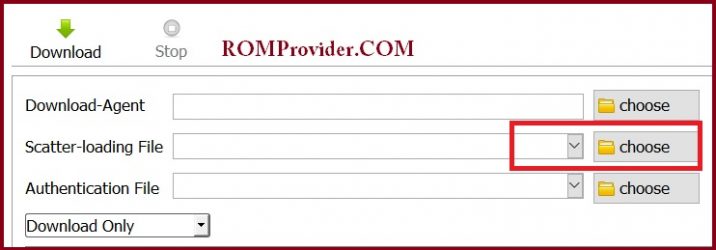
- Go to Download tab Click Scatter and Load Scatter File from ROM Folder
- Select Download Only. Click Download & Connect Your Switched off Phone.
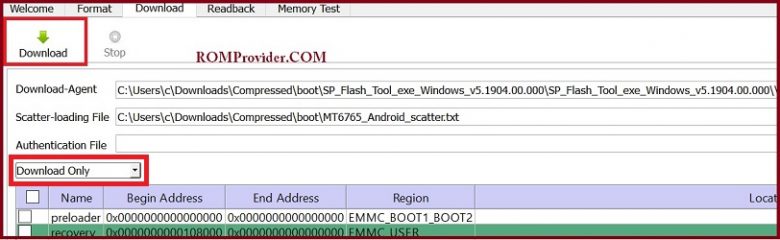
- You can see Flashing Process On Screen. after Complete unplug & Switch it On
Detailed Guide With Images:
Read also:
- How to unlock Bootloader
- How to Repair Device Network ID (Baseband) Number
- Google Camera 6.1 Working HDR Plus Portrait Mod Slow Motion
So this is a Complete Guide to Download Firmware and Flash This Device. if You have any question Let Me Know via Comment.