

Requirement’s & System Download Sections
To perform this cross-install successfully, your desktop workspace requires the uncompressed Global OnePlus Pad 3 Pro OPD2513 partition files paired with stable ADB command terminal binaries:
| Component Resource Name | Deployment Utility Profile | Direct Download Link |
| OnePlus OPD2513 Global ROM | OxygenOS 16 Fastboot Package | 📂 Download Pad3 Pro Global ROM |
| Fastboot Enhance Tool | Fastbootd & Payload Tool GUI | 📂 Fastboot Enhance Tool |
Technical Specifications & Critical Disclaimers:
-
Target Hardware Designation: OnePlus Pad 3 Pro OPD2513
-
Prerequisite State: Your device must have a completely unlocked bootloader. Note that unlocking the bootloader automatically commands a full hardware wipe of all local userdata.
-
OTA Update Rule: update not work
-
Flashing Risk: Overwriting low-level structural image files via manual terminal lines interfaces directly with raw memory install blocks. Proceed cautiously and entirely at your own risk.
Need Professional Assistance? If your bootloader option toggles are disabled, grayed out, or require specialized server token injection to allow cross-installing, skip the manual confusion. Contact Me Directly Here for Professional Device Conversion & Unlocking Services to receive expert remote terminal configuration support.
How to Flash OxygenOS 16 on OnePlus Pad 3 Pro OPD2513
- Download OnePlus Pad 3 Pro OPD2513 Firmware (OTA): Download latest official global firmware from the links above
- Download and Extract Fastboot Enhance Tool: Download the Fastboot Enhance Tool and extract the files to a convenient location on your computer.
- Reboot Phone to Fastboot Mode and Connect to Computer:
- Reboot your OnePlus Pad 3 Pro OPD2513 to Fastboot mode.
- Connect your device to your computer using a USB cable.
- Open Fastboot Enhance Tool: Launch the Fastboot Enhance Tool on your computer.
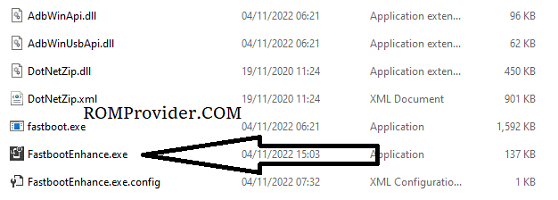
- Select Device Serial: On the initial screen of the Fastboot Enhance Tool, locate and double-click on your device’s serial number to establish a connection.
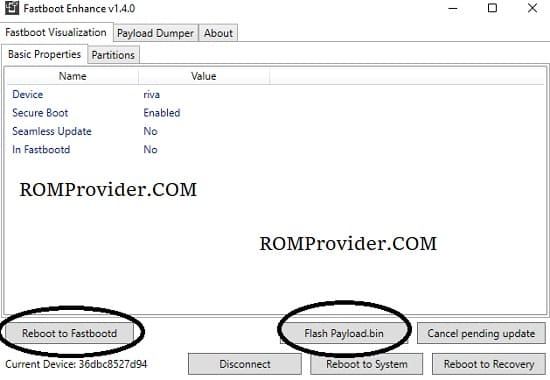
- Reboot to FastbootD: In the subsequent window, select ‘Reboot to FastbootD’ to ensure the device is in the correct mode for the firmware update.
- Flash Payload.bin:
- Click on ‘Flash payload.bin’ within the Fastboot Enhance Tool.
- A pop-up window will appear. Select the firmware payload.bin file that you downloaded earlier.
- Wait for Flashing Process: Wait until the tool finish flashing process, it may take 15-20min depend your pc performance.
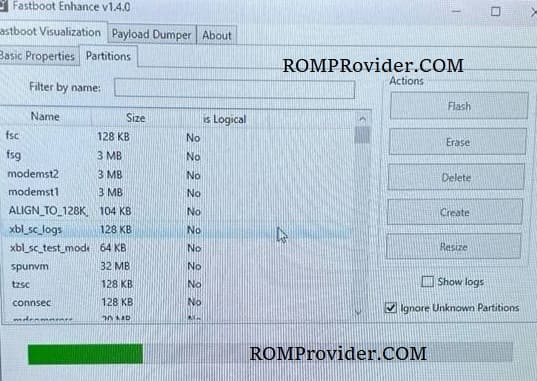
- Wipe Userdata and Reboot Device: Once the flashing process is successfully completed, wipe userdata. after that reboot your OnePlus Pad 3 Pro OPD2513.