

Rooting is the way to obtain Supersu Right’s on a Android device, that means after Rooting the Phone you have (sudo) full Right to perform any system task.after rooting the phone you can replace any system app & settings, you can run any specialized app that require administrator or sudo right.. if you own a android smartphone and want to root it then you can do it by following below Instructions..
Requirement:
- vbmeta.img
- unlock bootloader by following this guide
- ROM2box and required USB driver: Download
Note:
- all userdata will be erased, must make a backup before process
- Must write vbmeta.img after unlocking bootloader
- if the device has a vendor_boot partition patch & flash it too
- we strongly suggest below method (boot.img dump) because boot.img from a different firmware version may cause bootloop
- the boot image is NOT the bootloader image. do not confuse between them flashing the wrong image to bootloader could brick your device
How to Root Walton Primo H10:
- Install USBDK and Mediatek driver on Your computer
- Download & Extract ROM2box
- Run ROM2Box.exe
- Click Mediatek/Firmware Reader!
- mark “Full Firmware”
- click ‘START’ button
- Once the process Started, turn Phone OFF, Now together Press Volume up + down key & Insert USB, Once Phone detected Immediate Release key (make sure your phone stable in device manager)
- done, it will take 15-20Min
- Move boot.bin or boot_a.bin (rename it boot.img) from ROM2box/out folder to your phone
Note: if you wish to skip above steps then copy boot.img from stock firmware instead dump (make sure it’s from Installed firmware version)
- on Phone Install Magisk Manager
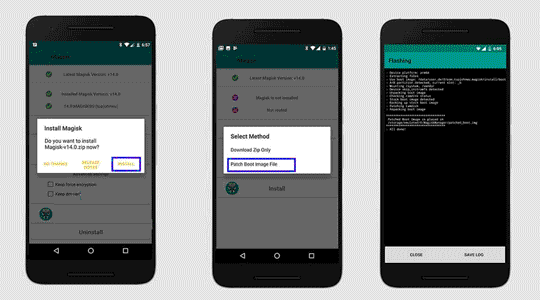
- Now patch boot.img using Magisk
- Download this root.zip & extract it
- Move patched_boot.img (rename boot.img) and vbmeta.img to root folder
- run root.bat & connect phone in fastboot mod
- wait until Success !
done, Your phone successfully rooted.
Related: