
Multi Image Kitchen (MIK) is a highly specialized, portable Windows utility designed for advanced Android developers, modders, and firmware engineers. It provides an all-in-one graphic workspace to unpack, modify, and repack raw or sparse Android partition images without setting up complex Linux command-line environments.
Whether you need to extract single partitions from a heavy OTA update package, rebuild an entire dynamic super.img structure, decompile an APK file, or customize boot animation logos, Multi Image Kitchen streamlines the entire process into a point-and-click Windows application.
📥 Direct Download Section (All Stable Builds)
Get the clean, official repository compilation packages directly below. These builds run portably on Windows and do not require a heavy setup installer script.
| Software Version Name | Release Profile & Support | Direct Download Link |
| Multi Image Kitchen v4.0 (Latest) | Super.img Rebuilding & Win 11 Fixes | 📂Download MIK v4.0 Build |
| Multi Image Kitchen v3.7 (Recommended) | Stable Universal Legacy Pack | 📂 Download MIK v3.7 Build |
| Multi Image Kitchen (Source Git) | Official GitHub Master Zip Archive | 📂 Download Main Source ZIP |
Technical Specifications:
-
Developer Source: CryptoNickSoft (Official Project Repository)
-
File Structure: Compressed Safe
.zipArchives -
Compatible OS: Windows 7, 8, 10, 11 (32-bit & 64-bit)
-
Infrastructure Rule: Ensure your target image names and destination storage path string files contain zero spaces or Cyrillic characters to avoid compression tool initialization failures.
Key Features of Multi Image Kitchen
-
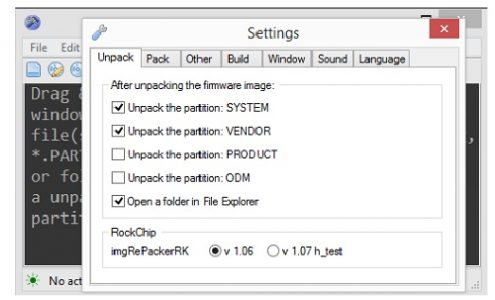
Universal Partition Repacking: Seamlessly unpack, edit, and reconstruct raw or sparse core Android folders—including
system,vendor,product,odm,socko, andelable. -
Extensive Format Matrix: Native cross-unpacking support handles multiple file extensions seamlessly:
*.img,*.fex,*.partition,*.new.dat,*.new.dat.br,*.lz4,*.ext4,*.tar, and*.md5. -
Dynamic Super.img Processing: Advanced scripts allow you to extract embedded sub-partitions cleanly from a unified
super.imgfile or pack individual system blocks back into an automated custom payload. -
Payload.bin Extraction: Acts as a built-in firmware dumper to cleanly split and extract separate flashable block files out of a single integrated OTA
payload.binlayout. -
Logo & Resource Editing: Unpack, view, swap, and assemble graphic asset partitions seamlessly, including
logo.img,logo.partition, andresource.img. -
Multi-SOC Architecture Support: Specialized packing engines pre-configured to unpack and bundle structural stock firmware images running on Amlogic, Rockchip, and Allwinner processor boxes.
-
Service Package Assembler: Unpack, customize, and cleanly bundle flashable OTA recovery update scripts into standard encrypted
update.zipstructures. -
Application Decompiler: Built-in extraction layer allowing you to quickly decompile, edit manifest strings, and compile customized Android applications (
*.apk).
How to Install and Prepare Multi Image Kitchen
Because the tool utilizes various terminal tools (like imgRePacker) running silently in the background, you must configure your local directory rules exactly as follows to prevent runtime crashes:
-
Download your chosen version (v4.0 or v3.7) from our direct download block table above.
-
Extract the compressed ZIP archive into a destination folder located as close to the root of your hard drive partition as possible (Example:
C:\MIK\orD:\MultiImageKitchen\).-
⚠️ Crucial File Rule: The entire destination directory path must not contain spaces or Cyrillic characters, otherwise the underlying decoding tools will fail to map the directory path.
-
-
Open the folder, right-click
MIK.exe, and click Run as Administrator to launch the graphical workspace panel. -
Click on the View menu options bar at the top control pane, and select Create shortcut on desktop to generate an automated launch icon on your home screen.
🛠️ Step-by-Step Guide: How to Unpack and Edit Partitions
💡 Optimization Tip: It is highly recommended to temporarily disable Windows Defender / Antivirus real-time scanning during extraction. Because the utility reads and writes thousands of tiny Android system configuration scripts recursively, active antivirus monitoring will drastically slow down the packing speed or cause false-positive failures.
Step 1: Loading Your Image Archive
-
Launch Multi Image Kitchen on your desktop workspace using administrative privileges.
-
Ensure you have closed all non-essential heavy software processes in the background to free up system memory (RAM).
-
Simply drag and drop your target firmware file (e.g.,
system.img,payload.bin, orupdate.zip) directly into the main tool window pane interface. Alternatively, copy the target file into the tool’s localized processing subfolder.
Step 2: Unpacking the Partitions
-
Once loaded, click on the Unpack option trigger matching your target file profile type display row.
-
The progress log screen will scroll sequentially as the tool decodes structural formats (such as extracting
.brcompression or mounting rawext4layouts). -
Once the task status logs complete, look inside your project workspace folder to find a fresh, uncompressed output directory containing the fully editable Android system file root tree.
Step 3: Modifying and Reassembling (Repacking)
-
Navigate inside the unpacked folder to add custom files, tweak layout scripts, clear bloatware, or insert rooted elements.
-
Once modifications are finalized, return to the Multi Image Kitchen workspace window panel.
-
Select the folder path containing your edited project files, and click on Pack / Assemble.
-
The utility will automatically recalibrate block space allocations, append standard volume labels, and compile a brand-new, perfectly flashable image file ready to be loaded via Fastboot, SP Flash Tool, or specialized SOC download utilities!
🔗 Related Alternative Android Firmware Dumpers
Looking to extract firmware components or configure alternative device flashing options? Check out our safe, dedicated tool repositories below: