
TFT Unlocker Digital is a highly versatile and powerful software utility designed for mobile technicians and enthusiasts to repair, bypass, and unlock Android smartphones. It offers a comprehensive set of features capable of managing demanding service tasks—such as erasing FRP locks, removing screen patterns, unlocking bootloaders, and flashing stock firmware.
Instead of needing expensive hardware boxes or digital dongles, TFT Unlocker provides a completely software-based environment to service your devices safely.
📥 Direct Download Section (All Stable Versions)
Always choose the correct tool build that matches your target handset’s processor model. Download the official setups below:
| Software Version Name | Release Year | Direct Download Link |
| TFT Digital v6.2.1.1 (Latest) | Stable Build | 📂 Download v6.2.1.1 Now |
| TFT Digital v6.1.1.1 | Stable Build | 📂 Download v6.1.1.1 Now |
| TFT Digital v4.8.0.0 | Older Legacy Build | 📂 Download v4.8.0.0 Now |
-
Setup Password:
TFT or softwarecrackguru -
Supported OS: Windows 7, 8, 10, 11 (32-bit & 64-bit)
-
Prerequisites: Ensure you have the proper USB drivers installed (MediaTek, Qualcomm, or Spreadtrum) depending on your phone’s chipset.
Comprehensive List of Supported Features
TFT Unlocker Digital acts as an all-in-one suite across major mobile processors. Here is what you can do with it:
Universal Functions
-
FRP Bypass: Wipe Google Account locks across multiple Android OS versions in one click.
-
Alive Demo Remove: Permanently exit live demo modes on store-display units (Oppo, Vivo, etc.).
-
Advanced Modes: Quick scripts for Fastboot-to-EDL forcing, Fastboot FRP clearing, and MTK FRP wiping.
Chipset & Brand Breakdowns
-
MediaTek (via Mtkclient): Supports extensive SOC structures (MT6765, MT6768, MT6873, etc.) running completely “Without Auth” (BROM Mode) over basic USB. Features include full firmware reading/writing, partition scanning, pattern wiping, and full factory resets.
-
Spreadtrum / Unisoc (via CMDloader): Enhanced compatibility for SC7731, SC7731E, SC9863A, SC9832E, and T610 processors. Easily wipe FRP, format user data strings, and execute deep firmware flashes.
-
Qualcomm: Advanced partition control splits across older EMMC memory chips and faster modern UFS internal storage profiles. Read/write structural ROM nodes and wipe broken partitions directly.
-
Samsung: Erase stubborn FRP locks, read diagnostic hardware info, wipe raw data blocks, and flash factory files straight from Download Mode.
-
Huawei: Quick-enable ADB diagnostic testing ports, clear factory FRP security protocols, and completely unpack generic
update.apparchive files.
How to Install TFT Digital Unlocker
Follow these setup steps to ensure the software initializes properly on your PC:
-
Download your chosen version from our repository link above.
-
Extract the compressed RAR file using WinRAR or 7-Zip. (When prompted for a security password, type
TFT). -
Open the extracted folder, right-click on the installation executable file, and select Run as Administrator.
-
Follow the basic on-screen installation wizard layout to complete the setup process.
How to Use TFT Digital Tool
-
Turn on a stable internet connection (a VPN may be required depending on your local region server hosting access).
-
Launch the TFT Digital application shortcut from your desktop.
-
Click the integrated Login button on the starting dashboard panel.
-
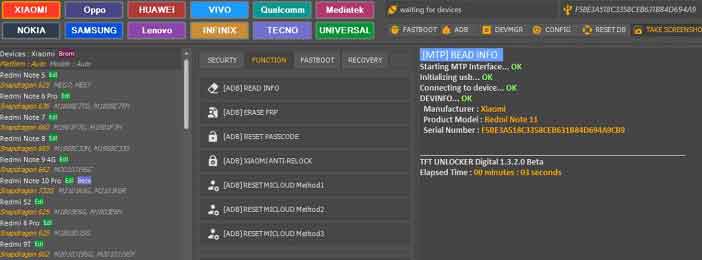
Once the main service workspace opens up, navigate to your phone’s respective brand tab (e.g., MediaTek, Samsung, Qualcomm) or structural chipset menu.
-
Choose your target service function (such as Erase FRP or Factory Reset).
-
Power off your phone, hold down its required hardware boot keys (usually Volume Up + Down), and connect it via USB. The program will automatically run the chosen operation!
🔗 Related Free Tool Downloads
Looking for alternative professional repair toolkits? Check out these highly recommended utilities: