

Download Stock Firmware/Flash File For Lenovo TB-X104F1:
Official Stock Firmware Flash File now available for the Lenovo TB-X104F1 & You can Download it From Below. Official Stock Firmware for Lenovo TB-X104F1 Will help You to Restore Your bricked device by using the QPST tools.
Lenovo TB-X104F1 Run on android 8.0 & it is Powered by QCOM SD 210 Processor. it is a Dual SIM (GSM) Smartphone Support Nano-SIM Card’s, Connectivity options include Wi-Fi, GPS, Bluetooth, USB OTG, FM, 3G & 4G. The Device come with 2GB of RAM and 16GB of Storage that can be expandable via SD card.
Note-
- Please Do carefully, we are not Responsible for any damage to Your device.
- Flashing the ROM Will Erase all Your Personal Data Including Storage. So we advice You to First Make a Complete backup of Your Phone.
- Ensure that Your Device at-least 50% Charge During Flashing Process to Prevent accidental Shut Down.
Must Require:
Firmware Information:
Device Name: Lenovo TB-X104F1
Type: Full ROM
Size: up to 2GB
SoC: QCOM SD 210
Os: Android 8.XX
Password: Null
Root access: Not
Gapps: Included
Firmware Version: TB-X104F_USR_S000046_1912251215_Q00039_ROW
Downloads:
Firmware:
Flash Tools:
- QFIL/QPST: Download
- Miracle Free: Download
usb Driver:
- QD Loader Driver: Here
How to Install Stock Firmware on Lenovo TB-X104F1:
- Download & Extract QFIL tools
- Download & Extract Firmware Package
- Install QD Loader usb Driver on PC
- Connect Phone to PC & Reboot to EDL use code Via adb: adb Reboot edl
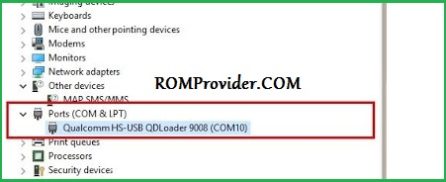
- You Can usb Driver Like below Image in Device Manager
- Run QFIL and Load Programmer and XML Files From ROM Folder
- Click Download
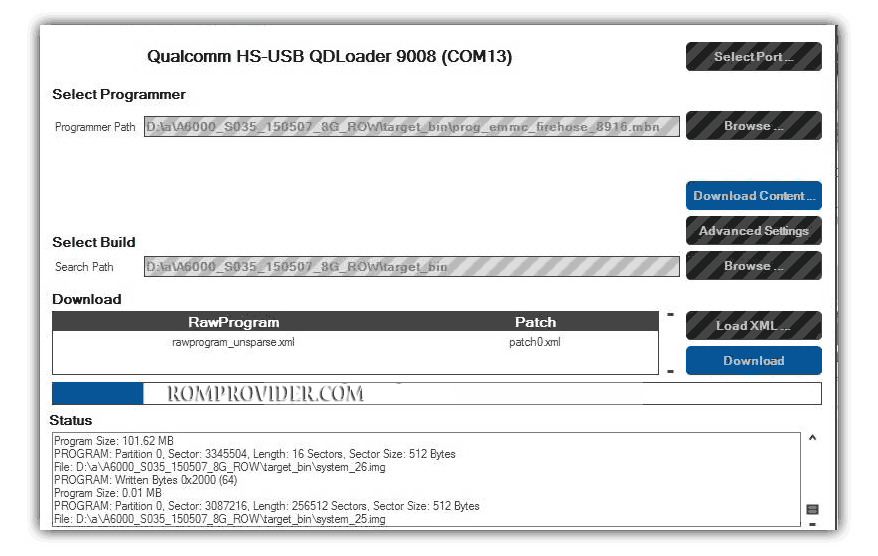
- Wait until Success. Your Phone Rebooted…