

Download Stock Firmware/Flash File For iPhone 7 Plus Clone:
Official Stock Firmware Flash File have now been available for the iPhone 7 Plus Clone & Now You can Download it From Below. Official Stock Firmware for iPhone 7 Plus Clone Will help You to Restore Your Bricked device. the Firmware come in Scatter format Which Can be Flash either with SP Flash tool or Miracle box.
iPhone 7 Plus Clone Run on android 5.1 & it is Powered by Mediatek MT6580 Processor. it is a Single SIM (GSM) Smartphone that Support Nano-SIM Card. Connectivity options include Wi-Fi, GPS, Bluetooth, USB OTG, FM, 3G.
Note-
- Must backup NVRAM using this Guide
- Please Do carefully, we are not Responsible for any damage to Your device.
- Flashing the ROM Will Erase all Your Personal Data Including Storage. So we advice You to First Make a Complete backup of Your Phone.
- Ensure that Your Device at-least 50% Charge During Flashing Process to Prevent accidental Shut Down.
Must Require:
Firmware Information:
Device Name: iPhone 7 Plus Clone
Type: Full ROM
Size: up to 500MB
SoC: Mediatek MT6580
Os: Android 5.1
Password: Null
Root access: Not
Gapps: Included
Firmware Version: MT658_alps_MN4A2ZPA__iPhone7_Plus_5.1_ALPS.L1.MP6.V2.19_BENRUI6580.WE.L_P2
Downloads:
Firmware Links:
- Firmware iPhone 7 Plus Clone : Download
Flash Tools:
- Miracle Free: Download
- SP flash tools 5.2: Download
Driver:
- Mediatek Preloader V-COM Driver: Download
How to Install Stock Firmware on iPhone 7 Plus Clone :
- Extract Downloaded Official Stock ROM..
- Install Mediatek Vcom Driver on Your PC.
- Download & Extract SP Flash tools, Run SP Flash tool.exe
- Go to Download tab Click Scatter and Load Scatter File from ROM Folder
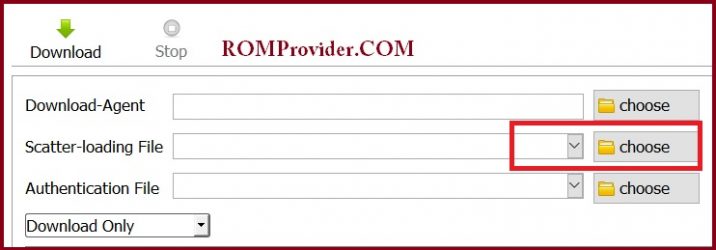
- Select Download Only. Click Download & Connect Your Switched off Phone.
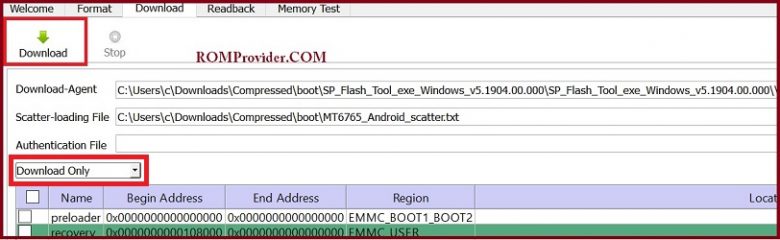
- You can see Flashing Process On Screen. after Complete unplug & Switch it On
Read also:
- How to Repair Device Network ID (Baseband) Number
- Google Camera 6.1 Working HDR Plus Portrait Mod Slow Motion
So this is a Complete Guide to Download Firmware and Flash The Device. if You have any question Let Me Know via Comment.