

Download Stock Firmware/Flash File for Lenovo Tab TB-X605L:
Download Official Stock Firmware Flash File For Lenovo Tab TB-X605L. If You own Lenovo Tab TB-X605L Smartphone and You want to download the Stock ROM /Flash File/For it then You are on a Correct Place, You have to do this by following the Below Guide.
Lenovo tab TB-X605L Run on Android 9.0 & it is Powered by QCOM SD 450 Processor. it is a Single SIM Tablet Support Micro SIM cards, Connectivity Option include 3G, 4G, WIFI, GPS and hotspot.
The Device Come with 2GB of RAM and 16GB of Storage Can be Expandable via SD card. in Camera Department it come with 5MP Rear Camera With 2MP front shooter.
Note-
- Flashing the ROM Will Erase all Your Personal Data Including Storage. So We advice You to First Make a Complete backup of Your Phone.
- Please Do Carefully, We are Not Responsible for any Damage to Your Device.
- Must backup NVRAM using this Guide before Doing anything.
- Ensure that Your Device at-least 50% Charge During Flashing Process to Prevent accidental Shut Down.
Must Require:
Firmware Information-
Device Name: Lenovo Tab TB-X605L
Type: Full ROM
ROM Size: up to 2GB
SoC: QCOM SD 450
Os: Android 9.0
Password: Null
Gapps: Included
Root access: Not
Firmware Version: TB-X605L_USER_S000020_20180921_Q00020_ROW
Downloads:
Firmware:
Flash Tools:
- QFIL/QPST: Download
- Miracle Free: Download
usb Driver:
- 9008 QD Loader Driver Here
How to Install Stock Firmware on Lenovo Tab TB-X605L:
- Download & Extract QFIL tools.
- Download & Extract Firmware Package.
- Install QD Loader usb Driver on PC
- Connect Phone to PC & Reboot to EDL use code Via adb: adb reboot edl
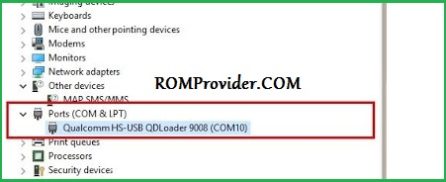
- You Can usb Driver Like below Image in Device Manager
- Run QFIL and Load Programmer and XML Files From ROM Folder
- Click Download
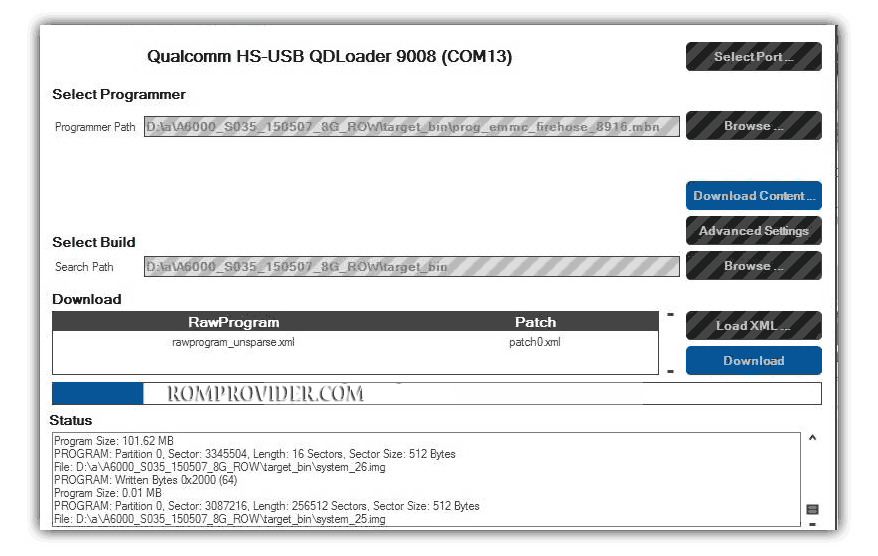
- Wait until Success. Your Phone Rebooted…
Read also: