

Download Stock Firmware/Flash File For Tecno BB4K:
Official Stock Firmware Flash File have now been available for the Tecno BB4K & Now You can Download it From Below. Official Stock Firmware for Tecno BB4K Will help You to Restore Your Bricked device. the firmware come in scatter format Which Can be Flash either with SP Flash tool or Miracle box.
Tecno BB4K Run on android 9.0 & it is Powered by Mediatek Processor. it is a Dual SIM (GSM) Smartphone Support Nano-SIM Card’s, Connectivity options include Wi-Fi, GPS, Bluetooth, USB OTG, FM, 3G.
Must Require:
Why We Need Stock Firmware?
- to downgrade a Phone
- to upgrade a Phone
- Fix some serious issue in phone
- Remove Factory Data Reset, Pattern and Pin lock
- fix bootloop and software issue on Phone
- completely Re-Installation of board software
Pre-Requirement’s
- backup NVRAM using this guide
- first make a complete backup of your Personal data (if Possible)
- charge the device at least 50% to prevent accidental shut down during the process
Firmware Information:
Device Name: Tecno BB4K
Type: Full ROM
Size: up to 1.1GB
SoC: Mediatek
Os: Android 9.0
Password: Null
Root access: Not
Gapps: Included
Firmware Version: BB4k-H6114UVW-PGo-200112V66
Download Links:
Firmware Links:
Flash Tools:
Driver:
- Mediatek Preloader V-COM Driver: Here
How to Install Stock Firmware on Tecno BB4K:
- Extract downloaded stock firmware..
- Install Mediatek VCOM driver on Your computer.
- Download & extract smartphone Flash tools on your computer
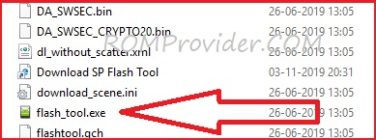
- from the flash tool folder Run flash_tool.exe
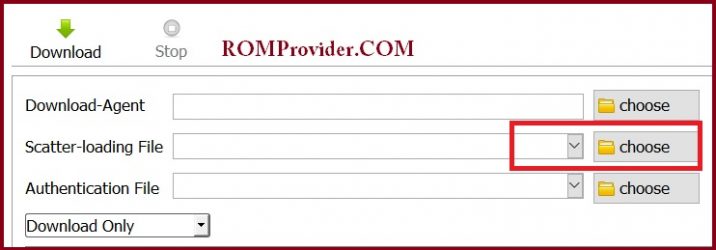
- Go to Download tab Click Scatter and load scatter file from ROM folder
- select Download only. Click Download & connect Your switched off Phone to PC by Pressing volume up & down key.
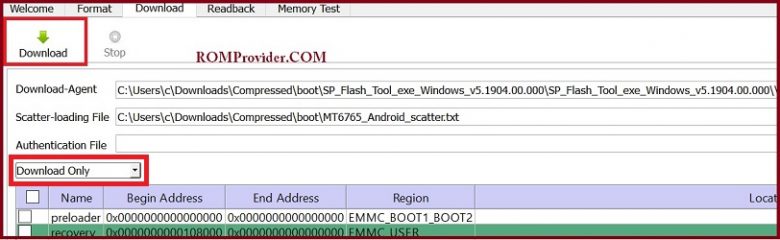
- You can see Flashing Process on screen. after complete unplug & switch it ON
Read also:
- How to unlock Bootloader
- How to Repair Device Network ID (Baseband) Number
- Google Camera 6.1 Working HDR Plus Portrait Mod Slow Motion
So this is a Complete Guide to Download Firmware and Flash The Device. if You have any question Let Me Know via Comment.