

The EDL test point is typically a set of pins on the Samsung Galaxy A15’s circuit board that can be shorted together in order to put the device into emergency download mode. In EDL mode, the device can communicate with a computer and receive new Firmware or software through a specialized tool such as SP Flash tool.
Note:
- do at own risk
How to Short Test Point:
- Install MTK USB driver on your computer
- remove back cover of the Phone
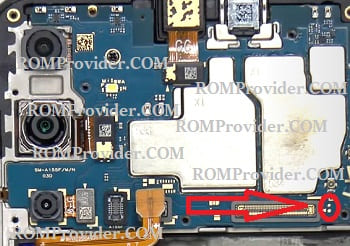
- search test point as show in below image
- Keep shorting the test point using a copper wire or tweezer + Insert usb
- Check USB COM device under COM Port in device manager
Samsung Galaxy A15 4G Test Point Image
Related: