

How to Reboot Realme 9 Pro to EDL Mod without test Point

learn How to Reboot Realme 9 Pro to qcom 9008 emergency download mod or EDL Mod, on this page we share fully tested method to reboot Realme 9 Pro to EDL Mod without using test point.

How to Reboot Realme 9 Pro to EDL Mod:

  • Install QCOM driver on your computer
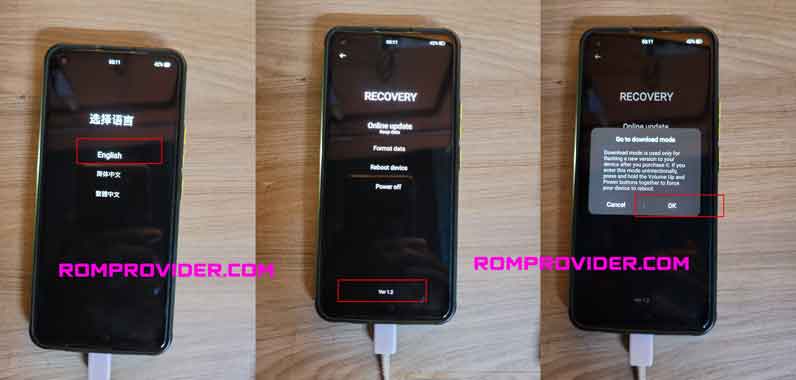
  • reboot phone to recovery mod (turn phone off together press volume down & power key)
  • In the recovery menu select English
  • connect phone to computer using usb cable
  • not repeated click on bottom recovery version text
  • from ‘Go to download mod’ popup select OK
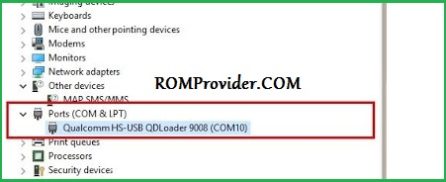
  • done, check device manager for 9008 usb COM
Related:

Disclaimer: ROMProvider.com is an independent informational directory and index. We strictly provide direct URLs to official, publicly available external sources. This website does not host, store, mirror, or upload any firmware, ROMs, or software files on its own servers. All brand names, logos, trademarks, and official product links are the exclusive property of their respective owners (OEMs). Use of these names does not imply any affiliation, sponsorship, or endorsement by the manufacturers. Users download external files and modify devices entirely at their own risk.