

If you own a Realme 14 Pro RMX5055 smartphone and want to convert it into global version, then you are in the right place. in this article we will walk you through the process to convert your chines Realme 14 Pro RMX5055 from a regional variant to a global variant.
Advantage of Global ROM:
- remove chines bloatware
- Install Google Play Services
- Multiple languages support
- Install Google Play Store
- Install and activating Android Auto
Note:
- Converting your ROM from a regional variant to a global variant can void your warranty and may cause issues with your device if not done correctly. Therefore, it’s essential to follow the instructions carefully and proceed at your own risk.
How to Convert Realme 14 Pro RMX5055 into Global
- Make complete backup of your device
- Contact Me to Covert Global, unbrick, Factory Data Reset & unlock or continue >>
- Download Global & Chines OTA’s from below links
- CN ROM
- GLO ROM
How to Install Global ROM on Realme 14 Pro RMX5055
- Copy both firmware to download folder on phone
- move CN file in root dir and global file in document
- go to settings software update, click three dot and select local install
- select global ota file, ‘Extract‘ button may appear
- don’t click extract, put the screen to pip
- delete or replace the cn ota with global ota from document dir
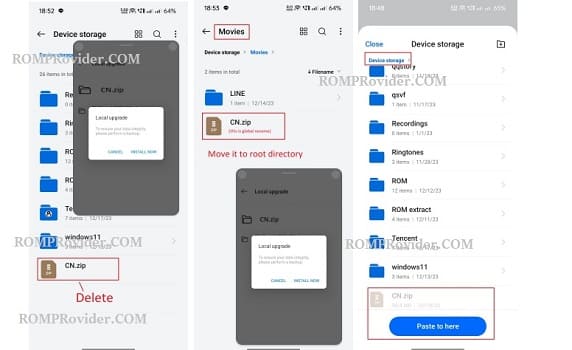
- in the pip click Extract button
- Wait until success, once done click reboot button
- after booting into global rom, update device to install global rom on both slot.