
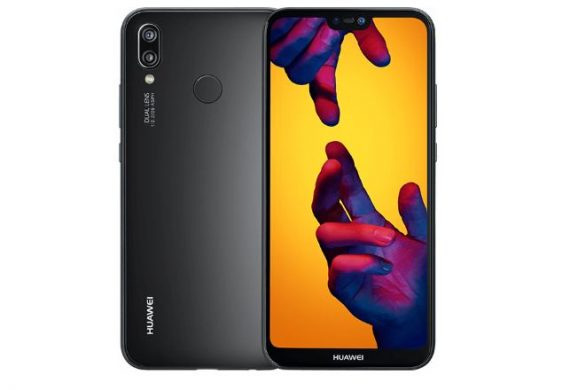
Download Flash File For Huawei P20 Lite Huawei ANE-LX1:
Official Stock Firmware/ Flash File have Now been available for the Huawei ANE-LX1 & Now You can Download it From below. You can use this Firmware to Reinstall the device Software.
Huawei ANE-LX1 Run on android 8.0 & it is Powered by Kirin 659 Processor. it is a Dual SIM (GSM) Smartphone Support Nano-SIM Cards, Connectivity options include Wi-Fi, GPS, Bluetooth, USB OTG, FM, 3G & 4G.
the device come with 4GB of RAM and 64GB of Storage that can be expandable via SD card. in camera department it come with 16+2MP Rear Camera With 16MP Front Shooter.
Note:
- Please Do carefully, we are not Responsible for any damage to Your device.
- Flashing the ROM Will Erase all Your Personal Data Including Storage. So we advice You to First Make a Complete backup of Your Phone.
- Ensure that Your Device at-least 50% Charge During Flashing Process to Prevent accidental Shut Down.
Must Require:
Firmware Information:
Device Name: Huawei ANE-LX1
Type: Board Software
Size: up to 1.2GB
SoC: Kirin 659
Os: Android 8.XX
Password: Null
Root access: Not
Gapps: unknown
Firmware Version: ANE-LX1 ANE-BD 1.0.0.39
Downloads:
Firmware Links:
Flash Tools:
- Huawei IDT 2.0: Download
How to Flash Huawei ANE-LX1:
- Download Require Firmware From above
- Download & Install Huawei USB COM Driver
- Download & Run IDT 2.0 and Click on Setting’s Icon
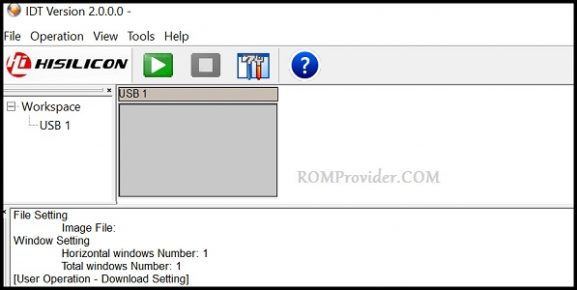
- Now load the XML File form Firmware Folder
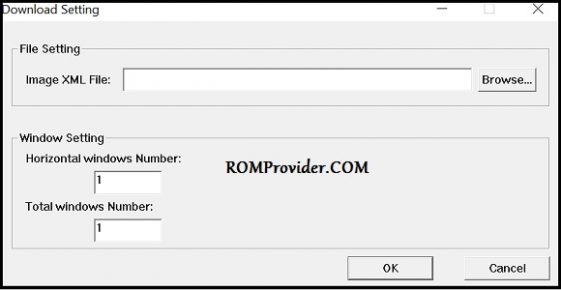
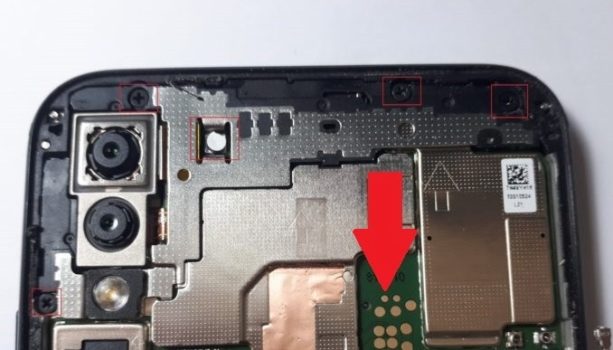
- Click OK, Connect Phone to PC and Short test Point Pinout
- Now Click Start.
- Wait until Installation Complete Done. update device to Latest Software via Recovery update
Test Point:
Related also:
have any question Let Me Know via Comment.