

Unlocking the bootloader on your OnePlus OPD2407 can open up a wide range of possibilities for customization and advanced modifications. In this blog post, we’ll provide a step-by-step guide on how to unlock the bootloader of the OnePlus OPD2407.
The OnePlus PAD OPD2407 runs on android 15 operating system, powered by mediatek d8350 processor. connectivity options include gps, wifi, bluetooth etc. sensors include gyroscope, proximity, gravity, etc. The device come with 8GB of RAM and 256GB of storage.
Disclaimer:
Before proceeding, it’s important to note that unlocking the bootloader may void your device warranty and could potentially lead to data loss.
Requirement’s:
How to unlock bootloader on OnePlus OPD2407:
- enable oem unlock and usb debugging from developers option
- connect device in fastboot mod
- Setup platform tools
- open cmd in platform tool folder
- connect device to computer in fastboot (use original cable)
- send below command
fastboot flashing unlock
- confirm bootloader unlock using the buttons
- done, your device successfully unlocked
How to Root OnePlus OPD2407:
- Download stock firmware
- install magisk app in phone
- move boot.img from firmware to phone
- open magisk app
- click install, browse and select the boot.img
- once patch done, copy patched file from phone/download folder to pc/platform tool folder
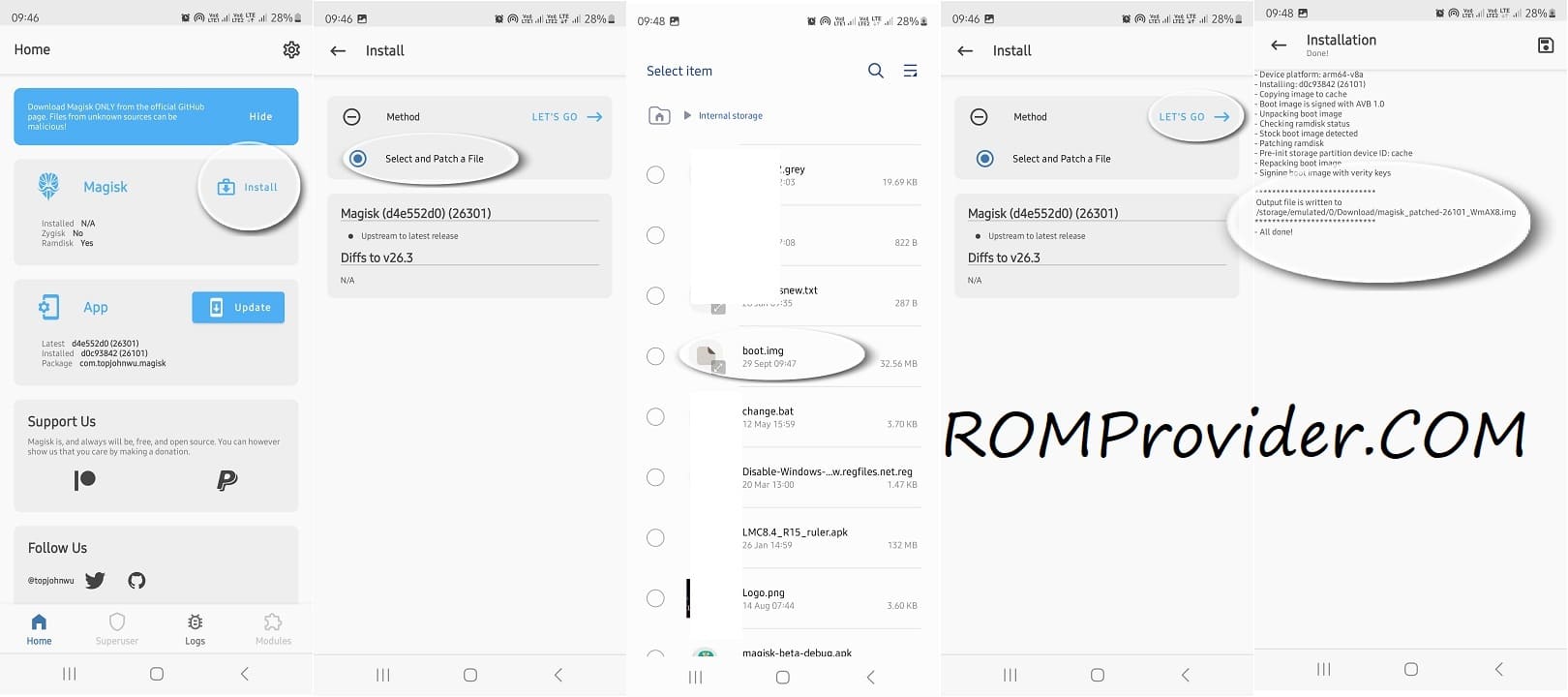
- reboot device in fastboot and connect it to computer
- flash patched file using below command
fastboot flash boot magisk_patched_boot.img
fastboot reboot
- done! you have successfully rooted your device