

Skip to content
ROMProvider.COM
  • Firmware Finder
    • Xiaomi Firmware Finder
    • Nothing Firmware Finder
    • Lenovo OTA Update Checker
    • KernelSU GKI SUSFS Kernel Finder
  • Tools
    • ROM2box
    • ARB Checker
    • Partition Backup Restore
  • How To
    • Root
    • Global ROM
    • Unlock Bootloader

Download Poco X5 5G Mi Account bypass File

March 10, 2024May 17, 2023 by Jeck24

Mi account bypass file refer to a file that is used to bypass Mi account lock on Poco X5 5G. the file contains some critical partition that is needed to remove the existing data from device partition.

Download Links:

  • Poco X5 5G Mi Account bypass File: Download

Note: SLA Enable device, Contact me for MI Flash Auth >>

How to Flash Poco X5 5G Mi Account bypass File:

  • Download and Install Qualcomm driver on your computer
  • Download extract & Install MI Flash on your computer
  • Run MI Flash Tools
  • Select Extracted File folder
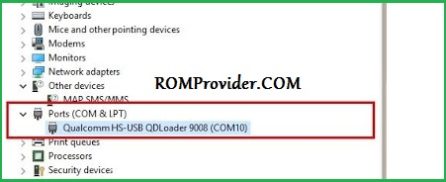
  • Reboot phone to EDL Mod and connect it to computer
  • Click ‘REFRESH‘ button
  • Once you see a device in MI Flash, Click ‘FLASH’
  • after some time a authentication Prompt will Open, enter your Xiaomi Auth Account credential
  • Request Auth
  • Wait until success. once done, disconnect device & switch it ON


Categories Xiaomi Tags bypass mi account, mi account, mi account bypass, mi account remove, Poco X5 5G, tutorial
Doogee V30T Firmware Flash File (Stock ROM)
Asus ROG Phone 7/ 7 Pro Test Point Reboot 9008 EDL Mod
  • OnePlus Pad 3 Pro OPD2513 Convert China to Global OxygenOS
  • Unbrick & Auth Flash OnePlus 13 / OnePlus 15 via O+ Tool
  • How to Unlock the Bootloader & Root Xiaomi Redmi K80
  • How to Unlock the Bootloader & Root Xiaomi 14 Series
  • Nubia Z70 Ultra NX733J Unlock Bootloader & Root
  • Sitemap
  • About us
  • Contact us
  • Privacy Policy
  • Terms & Conditions
© 2025 ROMProvider.COM