
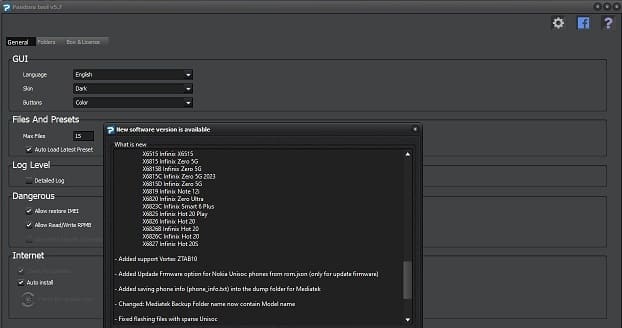
The Z3X Pandora Tool (commonly known as Pandora Box / Pandora Online) is a premium, top-tier hardware and software servicing instrument engineered for professional mobile repair shops. Built entirely from scratch with cutting-edge connection algorithms, this tool provides unparalleled low-level access to smartphones and tablets powered by MediaTek (MTK), Qualcomm (QCOM), and Spreadtrum/Unisoc (SPD) chipsets.
Pandora Tool is best-in-class for managing secure boot devices, offering deep partition controls, high-speed port communications, and safe unbricking workflows. It is highly sought after by technicians who need a reliable workspace to flash stock firmware, repair bootloaders, and manage security sectors without breaking system integrity.
📥 Direct Download Section (All Stable Builds)
Download the official setup files for the Pandora utility. Please note that this software requires an active Z3X Pandora hardware box, a digital smart card token, or an active Pandora Online subscription to authorize server communication.
| Software Build Name | Release Type | Direct Download Link |
| Z3X Pandora Tool v9.23 (Latest) | Official Setup Pack | 📂 Download Pandora Tool v9.23 |
| Z3X Pandora Tool v7.6 | Stable Older Build | 📂 Download Pandora Tool v7.6 |
| Z3X Pandora Tool v6.9 | Legacy Support Build | 📂 Download Pandora Tool v6.9 |
Technical Specifications:
-
File Structure: Official
.exeSetup Installer -
License Profile: Hardware Dongle / Digital Account Authenticated
-
Supported OS: Windows 7, 8, 10, 11 (32-bit & 64-bit)
-
Visual Optimization: Native high-definition UI scaler for 4K monitors.
Key Features of Z3X Pandora Tool
-
Multi-Module Core Support: Effortlessly switch tabs to handle specialized commands covering MediaTek, Qualcomm, and Spreadtrum/Unisoc processing chips.
-
Low-Level Flash & Upgrade: Simplifies deep firmware writing onto completely unresponsive or corrupted devices, ensuring your phones run the latest stock factory software builds.
-
Advanced Boot Repair & Unbricking: Specialized scripts to repair erased, broken, or incorrectly flashed
preloaderstructures, easily recovering units stuck in infinite bootloops or dead black-screen states. -
Carrier & Lock Wiping: Fully equipped to handle carrier network unlocking, region unlock resets, and one-click removal of pattern locks, PIN codes, or persistent Google account (FRP) blocks.
-
Complete Network & Security Repair: Read, write, or repair vital device identity fields, including International Mobile Equipment Identity (IMEI blocks), Patch Network profiles, Serial Numbers, and broken Huawei/Honor chip damage.
-
Memory Region Mapping: Advanced MemTool capabilities allow you to access, read, isolate, or format specific structural memory blocks (such as
NVData,NVRam, andRPMB) directly over maximum port speeds.
How to Install and Initialize Pandora Tool
Because the Z3X Pandora framework communicates via encrypted cloud validation servers, you must execute the configuration rules precisely:
-
Download the latest Z3X Pandora Tool v9.23 installer pack (or your preferred legacy build) from our high-speed table above.
-
Right-click the installation file and select Run as Administrator.
-
Accept the software terms and click Next to complete the standard setup wizard installation.
-
Connect your physical Pandora Box / Dongle to an active USB port (if using the hardware version).
-
Double-click the generated desktop application shortcut to launch the platform.
-
Navigate over to the Settings tab pane inside the starting panel framework and click Activate to securely link your digital smart card profile to the local build environment.
Step-by-Step Operations Guide
Step 1: Account Login & Model Configuration
-
Open the Pandora Tool suite on your desktop computer.
-
Input your verified Pandora Tool ID / Online Account Credentials to access the primary cloud-servicing terminal dashboard.
-
Browse the master manufacturer menu list to select your targeted phone brand and exact model version.
Step 2: Selecting and Triggering the Service Operation
-
Select your desired utility task script from the functional command workspace sidebars (such as Read Info, Erase FRP, Repair IMEI, or Write Flash).
-
If flashing a phone, load your official uncompressed scatter or factory firmware profiles into their respective slot matrix boxes.
-
Click the target execution button to drop the software into active connection standby.
Step 3: Hardware Port Connection
-
Power off the targeted smartphone completely.
-
Depending on your phone architecture requirements:
-
For MTK/SPD: Hold down the Volume Up + Volume Down keys together and connect the phone to the computer using a high-grade Type-C USB cord to trigger BROM mode.
-
For Qualcomm: Establish a hardware connection via mainboard Testpoints or access official EDL 9008 diagnostic COM ports.
-
-
The tool will deploy its localized high-speed communication payload. Leave the wire completely undisturbed until the terminal outputs a successful script completion message. Unplug your phone and reboot!
🔗 Related Professional GSM Flashing Setups
Looking to round out your engineering workstation with alternative premium diagnostic software suites? Check out our safe, dedicated repositories below: