

Realme GT Neo 3 RMX3562 Flash File Firmware Free Download:
official Stock Firmware Flash File Now available for the Realme GT Neo 3 RMX3562 & You can download it from below. by using this firmware you can solve all software Issues with in your Realme GT Neo 3 RMX3562 such as hang on Logo, Factory Data Reset lock, fastboot Mode, display Blank or White after Flash, dead recovery, dead after flash etc.
Realme GT Neo 3 RMX3562 Run on Android 12 & it is Powered by Mediatek dimnensity 8100 Processor. it is a dual SIM (GSM and GSM) smartphone support Nano-SIM cards. connectivity options Include Wi-Fi, GPS, Bluetooth, NFC, USB OTG, FM 3G 4G and 5G. the device come with 6GB of RAM and 128GB of Storage that can be expandable via SD card.
Note:
- flash carefully, we are Not responsible for any damage to Your device
- a customized DA file is require to restore download agent authentication
- it will erase all your personal data Including Internal storage. so we advice you to first make a complete backup of your Phone
Firmware Information: |
|
|---|---|
| Device Name: | Realme GT Neo 3 RMX3562 |
| ROM Type: | Full ROM |
| SoC: | Mediatek |
| OS: | Android 12 |
| Password: | Null |
| Gapps: | Included |
| Root Access: | No |
| Region: | china |
| Firmware Version: | RMX3562_11_A.32 |
Downloads Links:
China:
- RMX3562domestic_11_13.1.0.320CN01_2023090814470000
- RMX3562domestic_11_C.19_2023032715300000: Download
- RMX3562domestic_11_A.27_2022042922320000: Download
- RMX3562domestic_11_A.26_2022042201020000: Download
Flash Tools:
- SP Flash tool: Download
- ROM2box Full Free: Download
- Contact Me for unbrick Factory Data Reset, reset, region change and root
USB Driver:
- Mediatek USB Driver: Download
How to Flash Realme GT Neo 3 RMX3562 Via SP Flash tool:
Experimental:
- unpack downloaded Firmware using 7zip
- Now You have scatter firmware
- Install Mediatek Vcom driver on Your computer
- disable SLA Authentication by following this Guide (if not disabled You will face a BROM error or flash tool Require a Authorized account/ID)
- Download & Extract smartphone flash tools on your computer
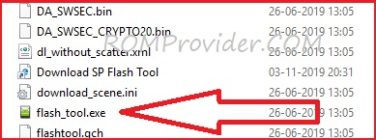
- from the flash tool folder Run flash_tool.exe
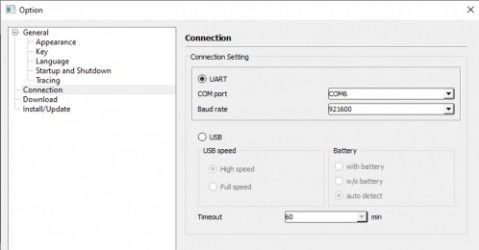
- set connection like below image (option/connection)
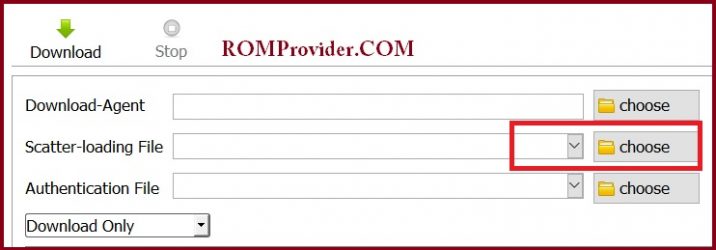
- Go to Download tab Click Scatter and Load Scatter File from ROM folder
- Repeat Process and load DA and Auth file too
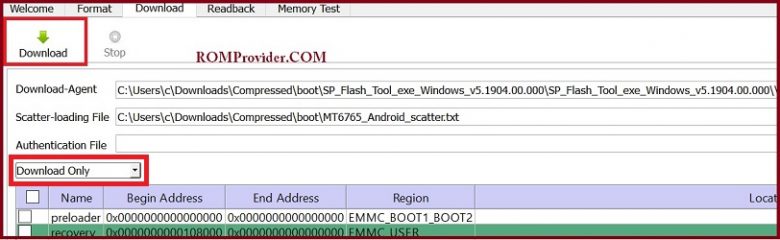
- from drop down Select ‘Download only‘
- Click ‘Download’
- turn Phone OFF, Now together Press Volume up + down key & Insert USB, Once Phone detected Immediate Release key (make sure your phone stable in device manager)
- You will see a Yellow flashing bar with flashing Process. once done, unplug device and switch it ON
Read also: