

Download Scatter Firmware for Oppo A77:
Official Stock Firmware Flash File Now available for the Oppo A77 & You can download it from below. The firmware come in scatter format which can be flash either with SP Flash tool or Miracle box. by using this firmware you can solve all software Issues on your Oppo A77 such as hang Logo, Factory Data Reset lock, fastboot Mode, display blank or white after flash, dead recovery, dead after flash etc. The method we share below is allow you to flash your device without authorized oppo ID or account.
Oppo A77 Run on Android 6.0 and it is Powered by Mediatek MT6750 Processor. it is a dual SIM smartphone support Nano SIM card, connectivity features Include hotspot, GPS, WIFI & Bluetooth. The device come with 4GB of RAM and 64GB of storage that can be expandable via SD card.
Must Require:
Why We Need Stock Firmware?
- to downgrade a Phone
- to upgrade a Phone
- Fix some serious issue in phone
- Remove Factory Data Reset, Pattern and Pin lock
- fix bootloop and software issue on Phone
- completely Re-Installation of board software
Pre-Requirement’s
- backup NVRAM using this Guide
- first make a complete backup of your Personal data (if Possible)
- charge the device at least 50% to prevent accidental shut down during the process
Firmware Information:
Device Name: Oppo A77
Type: Full ROM
Size: up to 1.8GB
SoC: Mediatek MT6750
Os: Android 6.0
Password: Null
Root access: Not
Gapps: Included
Firmware Version: CPH1609EX_11_A.18_170928
Download Links:
- VCOM Driver: Download
- SP Flash tool V5.2: Download
- restore tool & driver: Download
- Firmware Oppo A77 Scatter: Download
How to Flash Oppo A77 without authorized account:
- Download & extract all above files on your computer
- Install Mediatek driver on your computer
- Install Python on your computer
- You need to do as in the screenshot
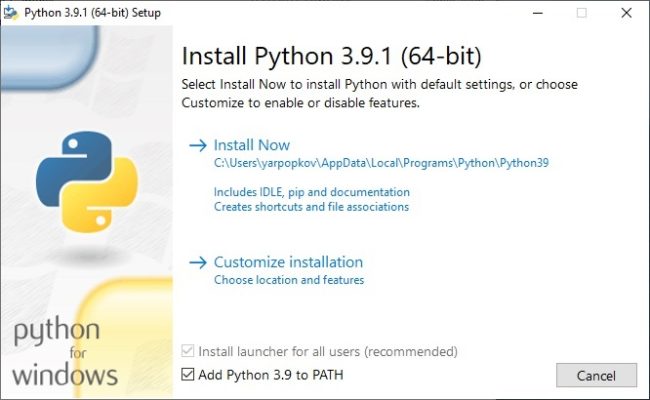
- Run CMD and type below code
python -m pip install pyusb pyserial json5
- Download this file Install and run https://sourceforge.net/projects/libusb-win32/files/libusb-win32-releases/1.2.6.0/libusb-win32-devel-filter-1.2.6.0.exe/download
- Run LIBUSB Win32 filter Installer and from the driver section Select Mediatek and Click Install
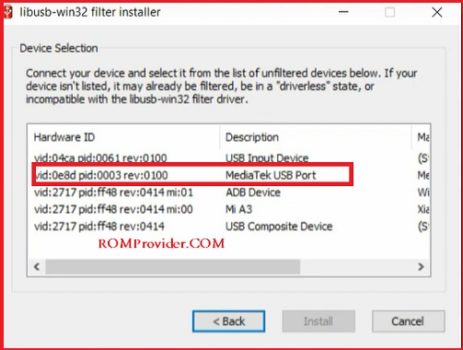
- on Phone Press Vol+ & connect it to the PC
- Go to the restore tool folder
- Launching brom.bat
- Close Window & Open the SP Flash tool folder
- on SP Flash tool Click Options > Options > connection and make the settings as in the screenshot (UART Connection mode)
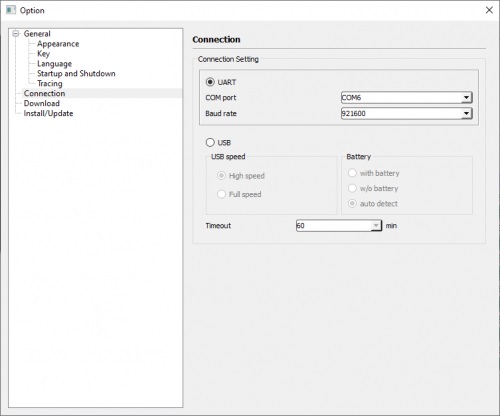
- open flash tool folder Run flash_tool.exe
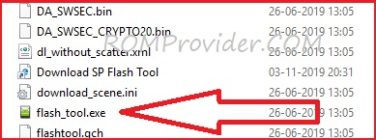
- Go to Download tab Click Scatter and Load Scatter File from ROM Folder
- under Download Agent load DA File (we Provide)
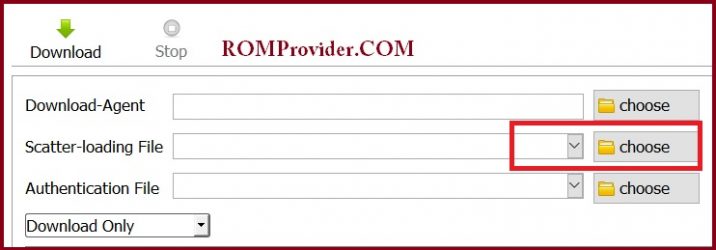
- From the drop down Select Download only.
- Click Download & connect Your switched off Phone by pressing volume up & down key.
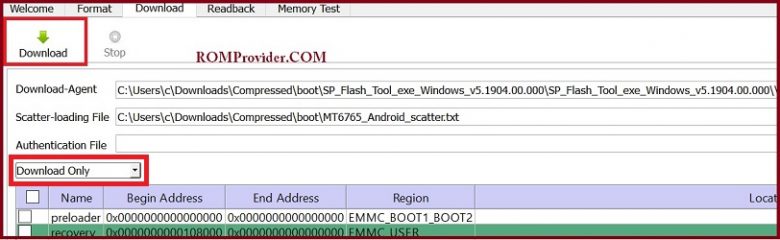
- You can see Flashing Process on screen. after complete unplug & switch it On
- done
Read also:
- How to Repair Device Network ID (Baseband) Number
- Google Camera 6.1 Working HDR Plus Portrait Mod Slow Motion
have any issue, Let me know via comment