

Download Oxygen OS 11.0.9.9.KB05BA update for OnePlus 8T:
Oxygen OS 11.0.9.9.KB05BA Firmware update Now available for OnePlus 8T and You can download it from below. However, an OTA is not always available to all users, either because of its location, region & Releasing phase. In this guide you will learn How to Install Oxygen OS 11.0.9.9.KB05BA update on OnePlus 8T.
The New Oxygen OS 11.0.9.9.KB05BA update Fixed the issue that the screen may flash when shooting in NIGHTSCAPE mode.
Note:
- make a backup before process
- it will note erase userdata but if any bootloop issue then wipe userdata from recovery
Must Require:
Firmware Information:
Device Name: OnePlus 8T
Type: Full OTA
Size: up to 2.76GB
SoC: QCOM
Os: Android
Password: Null
Root access: Not
Region: Global
Firmware Version: Oxygen OS 11.0.9.9.KB05BA
Download Links:
- Oxygen OS 11.0.9.9.KB05BA GLO: Download
Full Changelog:
System
• Improve stability and fixed known issues
Camera
• Fixed the issue that the screen may flash when shooting in NIGHTSCAPE mode
OnePlus Store
• An intuitive and convenient way to manage your OnePlus account, get easy-to-access support, discover exciting members-only benefits, and shop for OnePlus products. (Please note that it can be uninstalled)
How to Install Oxygen OS 11.0.9.9.KB05BA update on OnePlus 8T:
- Download latest update from above
- Move Downloaded file to device storage
- Restart Phone to recovery mod by pressing volume up & down key (in switched off Mod)
- In the Menu select ‘apply update from SD card’
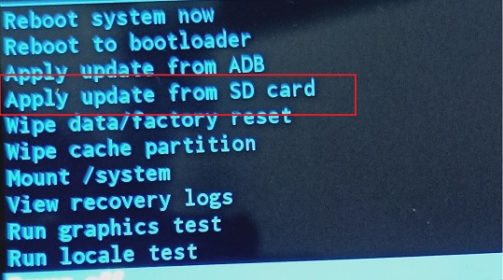
- Now browse for the downloaded file and select Install, once done go back & restart device
Note: Root user can flash it using the twrp.