
Skip to content
ROMProvider.COM
  • Firmware Finder
    • Xiaomi Firmware Finder
    • Nothing Firmware Finder
    • Lenovo OTA Update Checker
    • KernelSU GKI SUSFS Kernel Finder
  • Tools
    • ROM2box
    • Partition Backup Restore
  • QCN Files
    • Vivo QCN
    • Xiaomi QCN
    • Samsung QCN
  • FRP Files
    • Itel FRP Files

pinout finder

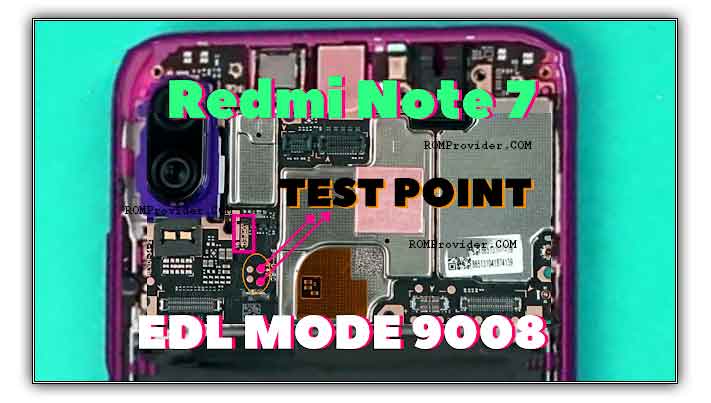
How to boot Redmi Note 7 to EDL & Fastboot Mod [test Point]
February 18, 2019 by Jeck24

Reboot Redmi Note 7 to EDL ,Recovery & fastboot Mod: How to Boot Redmi Note 7 to Recovery mod: Steps: Switch off Your Redmi Note 7. Once off, together Press the Power and volume up button. This will turn the Device on and You need to hold both the buttons till the Device logo disappears. … Read more

Categories A Support, Xiaomi Tags guide, pinout finder, Redmi Note 7, Test Point
Newer posts
← Previous Page1 Page2
  • Oppo Pad 4 Pro Convert China to Global ROM
  • How to Unlock Bootloader On Oppo Pad 4 Pro
  • How to unlock bootloader on Oppo Find X8 Ultra
  • How to Install Global ROM on OnePlus 15 PLK110
  • How to unlock bootloader on Oppo Find X7 Ultra
  • Sitemap
  • About us
  • Contact us
  • Privacy Policy
  • Terms & Conditions
© 2025 ROMProvider.COM