

Warning: Unlocking the bootloader will erase all data on your Unihertz 8849 Hike and may void its warranty. Make sure to back up your important files before proceeding.
Contact us if you need help unlocking the bootloader on your device.Step 1: Enable Developer Options and USB Debugging
- Go to Settings > About phone.
- Tap Build number multiple times until you see “You are now a developer!”
- Return to Settings > Developer options.
- Enable USB debugging and OEM unlocking.
Step 2: Install ADB and Fastboot Tools
- Download the latest platform tools and extract the zip file.
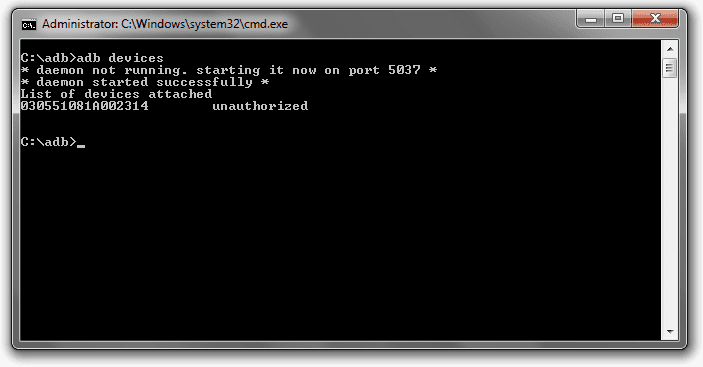
- Open Command Prompt inside the extracted folder and run the following to verify connection:
adb devices
Step 3: Reboot into Fastboot Mode
- Power off your Unihertz 8849 Hike completely.
- Press and hold Volume Down + Power until the Fastboot screen appears.
- Connect your phone to the PC using a USB cable.
Step 4: Unlock the Bootloader
- In the command prompt window, type one of the following commands:
fastboot flashing unlock
OR
fastboot oem unlock
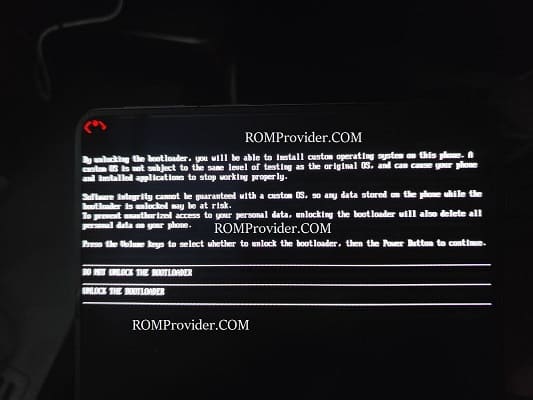
- A confirmation prompt will appear on your Unihertz 8849 Hike. Use the volume and power buttons to confirm bootloader unlock.
Step 5: Reboot Your Device
- Once the process completes, reboot your phone using:
fastboot reboot
Your bootloader is now unlocked! You can now flash custom ROMs, flash a custom recovery, or root your Unihertz 8849 Hike.