
Samsung SM-F946B (SM-F946B) Firmware Flash File, Tools & Solutions
Download Samsung SM-F946B official firmware, Stock ROMs, and recovery files for free
Firmware & Solutions for SM-F946B
- Version: prog-firehose-ddr-bit3.elf
- Updated: March 24, 2026 07:44:46
- Type: Solution
Installation Guide for Samsung SM-F946B Stock Firmware
Step1: Boot Into Download Mod >>
- Power the phone off completely.
- Press and hold Volume Down + Volume Up at the same time.
- Keep holding until you see a warning screen.
- Press Volume Up to accept and enter Download Mode.
Step 2 — Get the Right Firmware
Download Correct Firmware, There are multiple parts to the firmware package:- AP — main Android system
- BL — bootloader
- CP — modem/radio
- CSC / HOME_CSC — region/service software
Be careful which CSC file you pick:
- HOME_CSC → keeps your data (dirty flash)
- CSC → wipes data (clean install)
Step 3: Firmware Flash
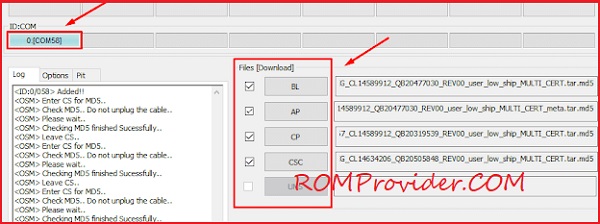
- Open Odin on your PC.
- Load each firmware component into its slot:
- BL → Bootloader file
- AP → Main firmware
- CP → Modem
- CSC → HOME_CSC (important)

- In Odin’s Options, make sure Re-Partition is enabled only if you loaded the PIT file.
- Click Start.
⚠️ Disclaimer & Safety Guidelines
- Proceed at your own risk – Wrong flashing may brick your device.
- Always make a full backup before process.
- Make sure your device is charged.
Note: All resources on this page are sourced from public domains and community efforts. For removal requests or issues, contact us directly.