
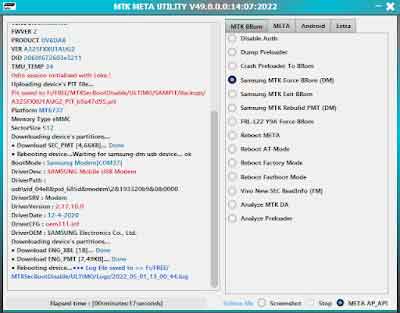
Android Utility (widely known as MTK Meta Utility) is one of the most powerful, free universal smartphone servicing tools available today. It is a must-have application for technicians looking to service MediaTek (MTK), Qualcomm (QCOM), and Unisoc/Spreadtrum (SPD) devices without purchasing expensive physical hardware boxes.
From forcing stubborn devices into EDL or BROM modes to unpacking encrypted firmware, flashing stock ROMs, and executing one-click FRP bypasses, this tool handles it all seamlessly.
📥 Direct Download Section (Latest Setup)
Download the official, untampered portable version of the utility below.
| Software Version Name | Release Type | Direct Download Link |
| Android Utility v200 (Latest) | Stable Portable Pack | 📂 Download Android Utility v200 Now |
-
Setup Password:
mfdl -
File Structure: Portable 100% (No installation required)
-
Supported OS: Windows 7, 8, 10, 11 (32-bit & 64-bit)
💡 Tech Note: Because this tool interacts directly with your computer’s low-level USB ports to bypass device security, your antivirus software might flag it as a false positive. We recommend temporarily pausing your real-time protection before extracting the folder to ensure it runs correctly.
Key Features & Capabilities of Android Utility
This software is packed with hundreds of advanced service functions. Here are the most popular features:
-
Universal FRP Bypass: Wipe Google Account security verification screens on almost any Android device in seconds.
-
Force Boot Modes: Instantly force MediaTek chipsets into BROM Mode and Qualcomm/Spreadtrum devices into EDL 9008 Mode using pure software commands (no hardware test points needed in most cases).
-
Firmware Unpacker & Repacker: Easily extract and deconstruct highly encrypted factory firmware packages from Oppo (.ofp) and Huawei (.app).
-
MediaTek Meta Mode Repair: Boot your MTK device directly into Meta Mode to perform safe hardware testing, IMEI diagnostics, and partition calibration.
-
Bootloader & Partition Repair: Unlock or relock bootloaders safely, fix broken partition map indexes, and repair corrupted Samsung PIT files.
-
Universal Screen Lock Removal: Clear screen patterns, PINs, and password locks without deleting user data on supported older architectures.
-
Advanced Flashing Formats: Full native support for standard MediaTek flashing alongside official Huawei DLOAD firmware flashing via USB.
How to Install and Run Android Utility
The software is completely portable, meaning it won’t bloat your Windows registry. Follow these exact steps to launch it:
-
Download the Android Utility ZIP archive from our direct link above.
-
Extract the file contents directly to your local C: Drive or Desktop using WinRAR or 7-Zip.
-
When prompted for a password during extraction, type
mfdl. -
Open the extracted folder, look for
Android Utility.exe, right-click it, and select Run as Administrator. -
Follow any quick initial on-screen prompts, and the main dashboard will instantly open up for use!
Step-by-Step Operational Instructions
1. Bypassing Google FRP or Screen Locks
-
Open the tool and navigate to either the MediaTek or Main tab dashboard.
-
Select your targeted option (e.g., Bypass FRP or Wipe Userlock).
-
Click the Start button to put the tool on connection standby.
-
Turn off your device completely. Hold both the Volume Up + Volume Down buttons, and connect it to your computer with a high-quality USB cable. The tool will auto-detect the phone and complete the bypass in under 10 seconds!
2. Forcing EDL / BROM Mode via Software
-
If you are trying to flash a phone that refuses to enter download mode normally, head to the Service tab layer.
-
Click on Force BROM (MTK) or Force EDL (Spreadtrum/Qualcomm).
-
Connect your switched-off phone to the PC while holding your volume keys. The tool will inject a payload sequence that forces the phone’s bootloader directly into an emergency state, making it ready to flash in tools like QFIL or SP Flash Tool.
🔗 Related Free Tech Toolkits
Need to expand your digital workbench? Check out this excellent premium companion utility:
📌 Disclaimer: Please note that for any system bug reports, structural crashes, or specific model requests, you must contact the official developer team. We host and share clean setup files to ensure easy, high-speed access for the repair community.