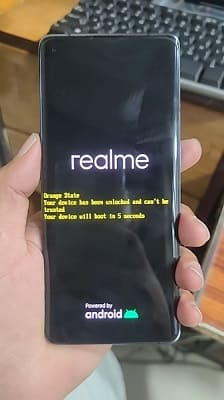
The Realme GT Master Explorer Edition RMX3366 is a mid-range smartphone and unlocking the bootloader is the first step if you want to unlock its full potential beyond the stock limitations.
If you are a person who loves to customise your device, install custom ROMs, root or tweak performance then unlocking the bootloader is freedom for you. However, it is important to note that this process will wipe all of your data and could possibly void your warranty So, be sure to back everything up
Realme GT Master Explorer Edition features solid hardware and a clean software experience right out of the box, but that’s just the beginning for power users. Once unlocked, you can flash custom recoveries, play around with different Android builds, or tweak the system just how you want.
Requirements
How to Unlock Bootloader on Realme RMX3366:
- » Open QLM Auto Tool & Login
- » Select Model Brand Realme & Model “Q5-Pro“
- » Make a full firmware backup
- » On device Enable USB debugging + oem Unlock from developers Options
- » Connect Device Normal adb mod
- » Click Unlock Bootloader
- » Wait For Success Msg in the the Tool
- » Then confirm unlock by pressing volume down and power button, the display id black, you have to confirm unlocking status by using fastboot
- » After done, reconnect the device in EDL Mod, the tool restore your device back, if not work, then restore the backup we make earlier.
How to Realme RMX3366:
- Download stock Stock ROM (must match installed Stock ROM version)
- Extract init_boot.img from it
- Move init_boot.img to phone storage
- Install prepared root app, magisk or sukisu ultra
- Click install, browse and & Select the document we moved
- After patching the document, move it back to pc
- Now flash the file
fastboot flash init_boot init_boot.imgfastboot reboot
Your device now successfully rooted…
Manual Method:
the tool use engineering method to unlock, we dont have files..
success report: